Downloading and setting up NetSim File Exchange Projects
| Applicable Versions | NetSim Standard | NetSim Pro |
Scroll down the article for the steps to download and import File Exchange Projects for the appropriate version number you may be using.
| Applicable Release | v14.4 |
1. Use the Project Download from the link provided in the project documentation (For eg: https://www.tetcos.com/file-exchange.html) to download a compressed zip folder of the Project.
2. Extract the zip folder.
3. The extracted project folder generally consists of Documentation and a NetSim workspace/ Experiment file (*.netsimexp).
For example,

4. Import the NetSim Workspace file
- In NetSim Home Screen go to Your Work -> Import button
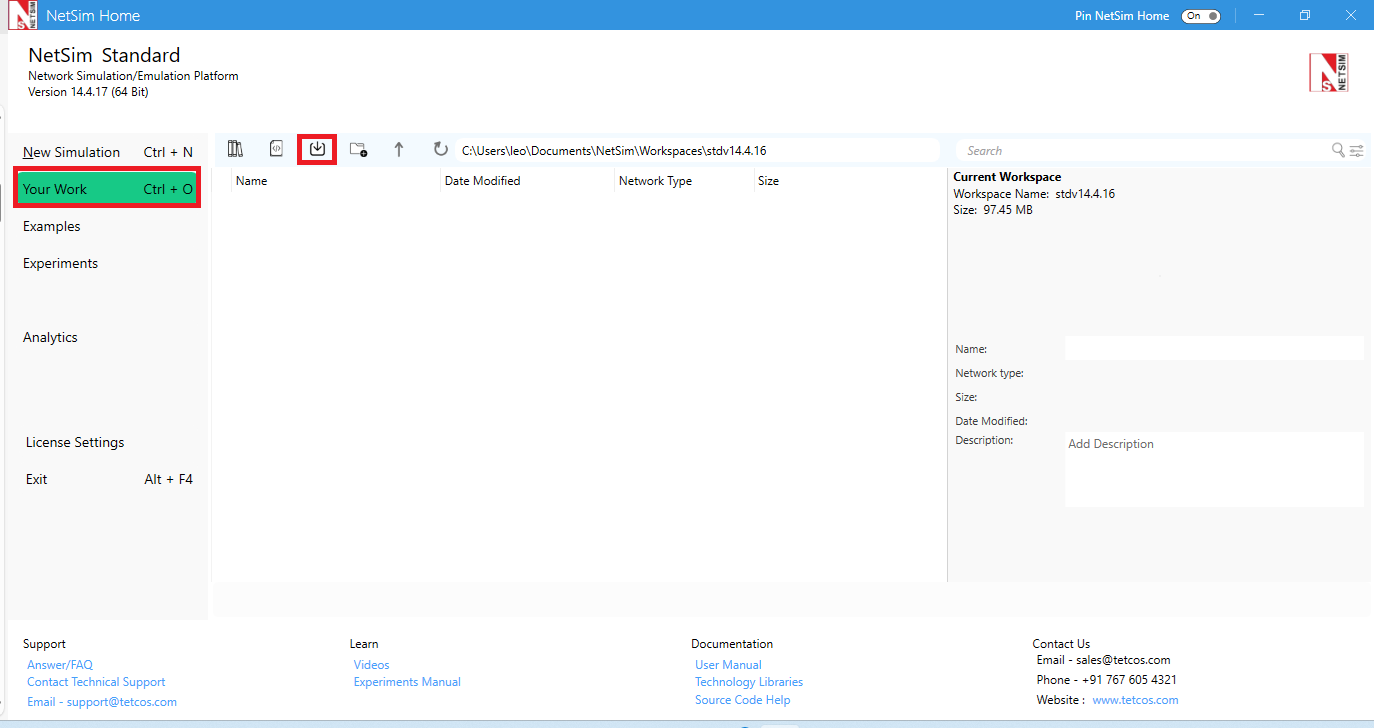
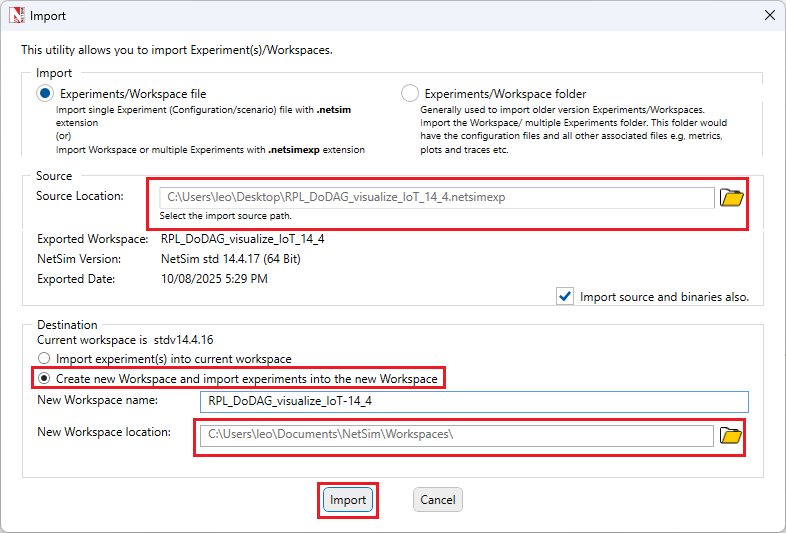
- In the Import window, under the Source section, browse and select the downloaded Workspace file *.netsimexp for the source location option.
- Under the Destination section, select the "Create new Workspace and import experiments into the new Workspace" radio button.
- Further, browse and select the new workspace location to create the workspace directory.
- Click on Import.
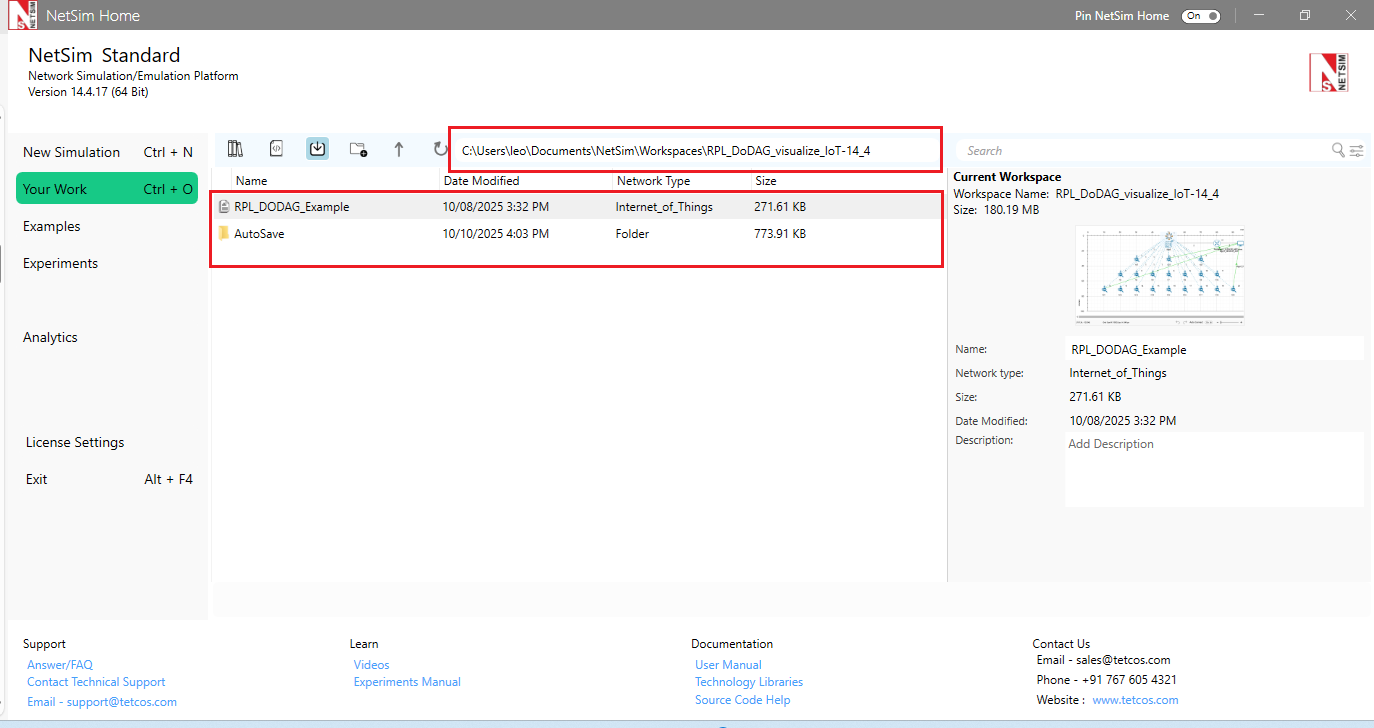
5. The imported experiments and binaries/ source codes will be shown in the Your Work Menu of the new workspace
| Applicable Release | v13.2 | v13.3 |
1. Use the Project Download from the link provided in the project documentation (For eg: https://www.tetcos.com/file-exchange.html) to download a compressed zip folder of the Project.
2. Extract the zip folder.
3. The extracted project folder generally consists of Documentation and a NetSim workspace/ Experiment file (*.netsimexp).
For example,
4. Import the NetSim Workspace file
- In NetSim Home Screen go to Your Work -> Import

- In the Import window, under the Source section, browse and select the downloaded Workspace file *.netsimexp for the source location option.
- Under the Destination section, select the "Create new Workspace and import experiments into the new Workspace" radio button.
- Further, browse and select the new workspace location to create the workspace directory.
- Click on Import.

5. The imported experiments and binaries/ source codes will be shown in the Your Work Menu of the new workspace

| Applicable Release | v13.1 |
1. Use the Project Download Link provided in the project documentation (For eg: https://www.tetcos.com/file-exchange.html) to download a compressed zip folder of the Project.
2. Extract the zip folder.
3. The extracted project folder generally consists of Documentation and a NetSim workspace/ Experiment file (*.netsimexp).
For example,

4. Import the NetSim Workspace file
- In NetSim Home Screen go to Your Work -> Import

- Input the path from where (i) the experiments (a single folder) or (ii) the workspace will be imported. Note that only previously exported experiment/workspaces with “. netsim_exp” extension can be imported.
- By Selecting “Import source and binaries also” user can import source code and binaries present along with the exported experiments or workspace.

5. The imported experiments and binaries/ source codes will be shown in the Your Work Menu of the new workspace

| Applicable Release | v13.0 |
Follow the steps given below to download and setup NetSim file exchange projects:
1. Use the Project Download Link to download a compressed zip folder of the Project.
2. Extract the zip folder.
3. The extracted project folder generally consists of Documentation and a NetSim workspace file (*.netsim_wsp).
For example,

4. Import the NetSim Workspace file
- In NetSim Home Screen go to Your Work -> Workspace options

- Click on the More Options button

- Click on the Import Button

- In the Import Workspace Window that appears browse and select the *.netsim_wsp file from the extracted project directory and for the Destination path browse to select a path in your system where you want to set up the workspace folder.
For Example,

- Click on OK to Import the Workspace
5. While Importing the workspace, if the following warning message indicating a software version mismatch is displayed, it can be ignored by clicking on OK.

6. The Imported Project workspace will automatically be set as the current workspace.