How can a report with user information, on NetSim license usage be obtained?
NetSim uses Reprise License Manager (RLM). Hence users can log the license usage to keep track of lab attendance.
Following is the procedure on how to log NetSim license usage automatically as the license starts running:
Accessing the license server web console:
- Once the license server process (rlm.exe) is running the license manager web console can be accessed using any web browser.
- The console can be accessed by using the IP address and web server port number. For example:
- localhost:5054 - can be used to access the web portal from the system where the license server process is running.
- <IP ADDRESS OF LICENSE SERVER>:5054 can be used to access the web portal from any other system that is part of the same network.
- Note that the default webserver port number is 5054
- The license manager web console opened in a web browser is shown below:
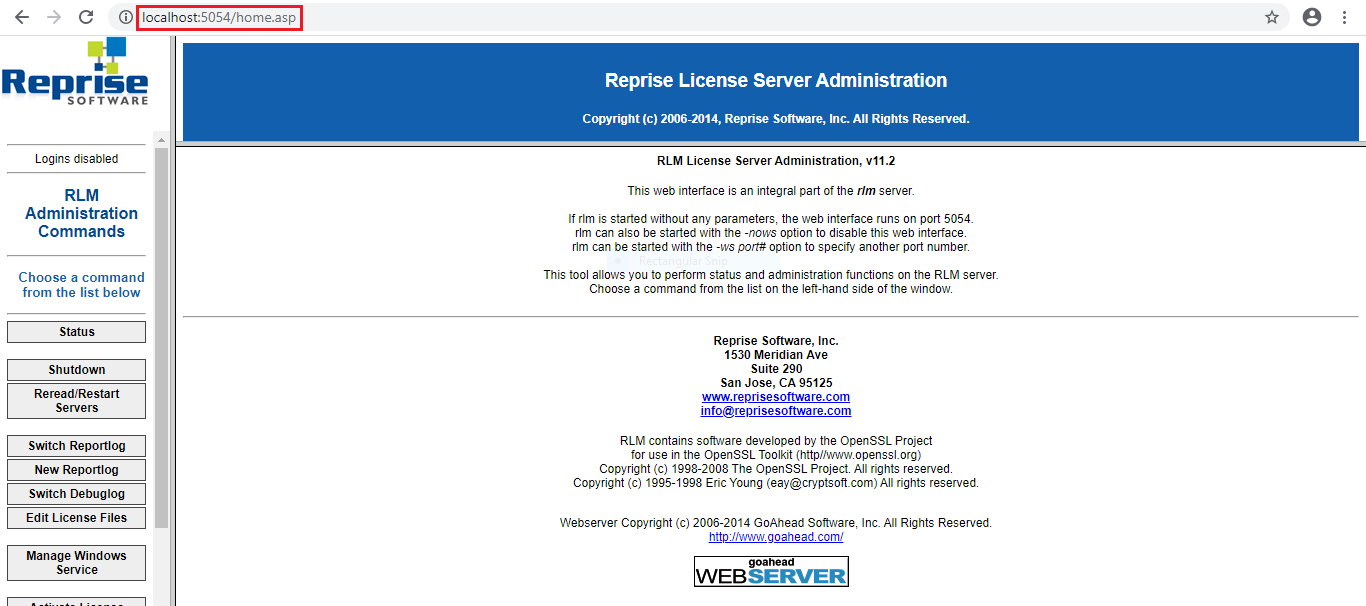
- Options and settings related to license management can be found in the console's left bar.
Logging license usage:
Steps to generate logs by configuring additional options file are given below:
STEP 1: Click on the Status button in the web console
STEP 2: Click on tetcos button under OPTIONS column as shown below
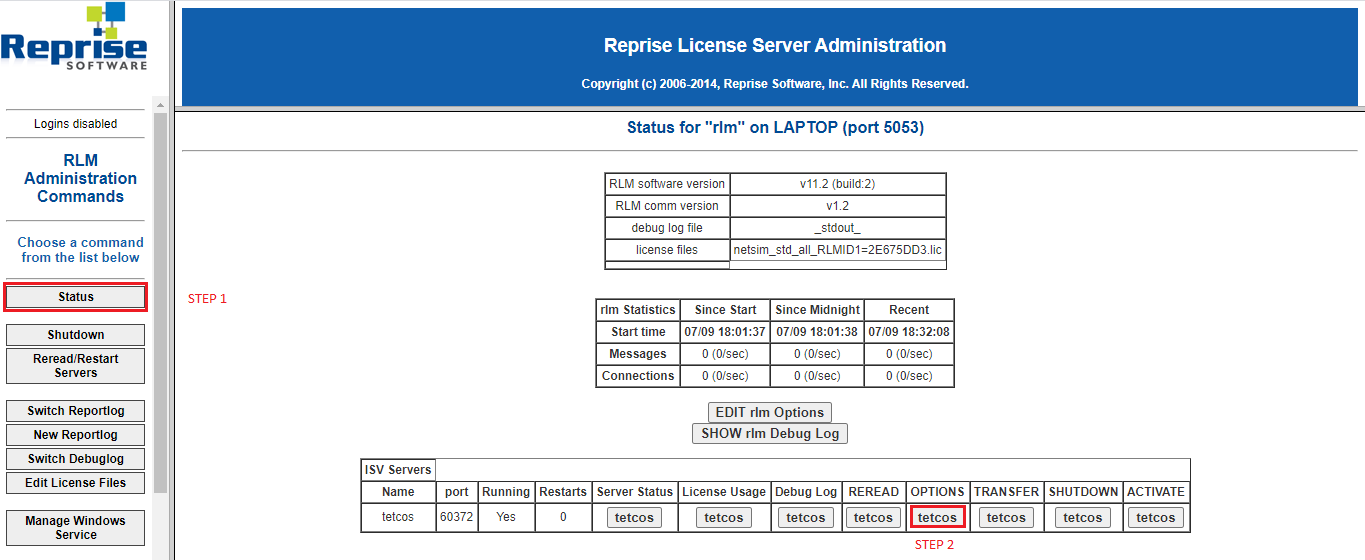
STEP 3: In the edit ISV options form that appears, add commands as explained below:
Syntax to generate License log is
REPORTLOG [+]file_name [std | small | detailed]
Example:
REPORTLOG +Student_lic_usage.txt std
- This will create a log file named Student_lic_usage.txt file in the License server directory which logs the license usage. The log information keeps getting appended to the log file even on restarting the license server.
- The type of log can be set to detail, standard (std), or small; if no type is specified, a standard log is created.
- Standard type lists typical client license information.
- Small type includes only minimal license connection information,
- While the detailed type includes the client's OS, the date, and other details.
Logging for a specific period of time:
If logs are to be generated for a certain period of time say daily/ weekly/ monthly/ N number of days then the ROTATE command option can be used.
Syntax of rotate command options is
ROTATE [daily | weekly | monthly | #days ]
Example:
ROTATE monthly
- This will keep logging license usage on a monthly basis. New logs will be generated each month with the file name prefixed with the respective month.
- ROTATE and REPORTLOG can be combined for this purpose.
Example:
ROTATE monthly
REPORTLOG +Student_License_Usage.txt std
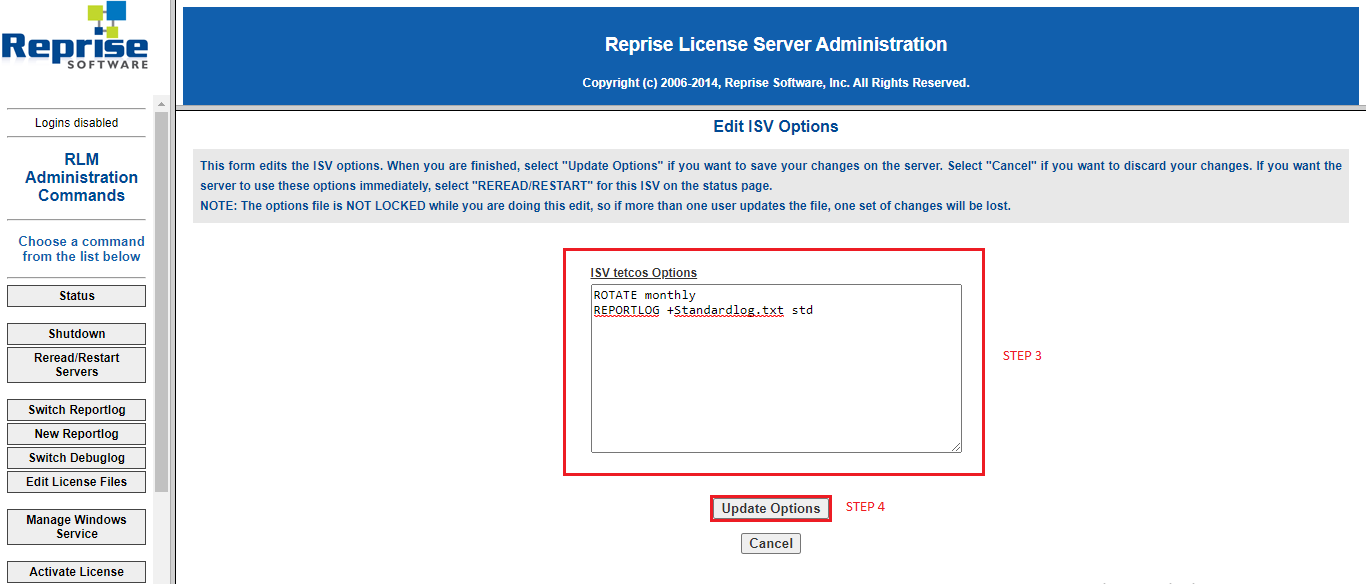
STEP 4: After adding the necessary commands to generate logs. Update Options button can be used to create an options file automatically.
STEP 5: Restart NetSim License server
Once the license server process has been started successfully, log file with name as specified in Step 3 will start getting written as per the software usage and license checkouts.
Example :
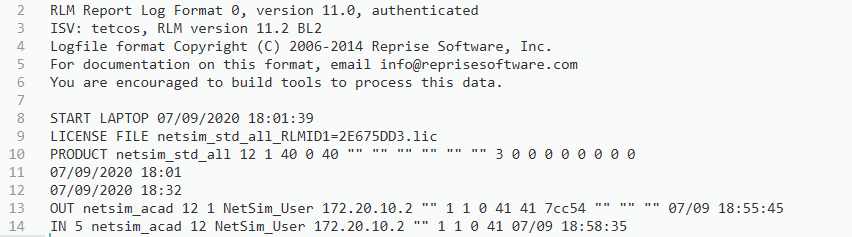
In the above screenshot, the line numbers 13 and 14 i.e
OUT netsim_acad 12 1 NetSim_User 172.20.10.2 "" 1 1 0 41 41 7cc54 "" "" "" 07/09 18:55:45
IN 5 netsim_acad 12 NetSim_User 172.20.10.2 "" 1 1 0 41 07/09 18:58:35
can be understood as:
OUT - The licenses are checked out/ or started using NetSim
netsim_acad - NetSim flavor name
NetSIm_User - Users/ Students Username of system or Laptop
172.20.10.2 - IP address of the user/ student
18:55:45 - Time at which NetSim started in the user system
IN - The licenses are checked in or stopped using NetSim
18:58:35 - Tim at which NetSim stopped in the User system
Additional Information on REPORTLOG and ROTATE is available in RLM License administration manual attached to this article.
Page number 76 of RLM License Administration Document i.e Section on REPORTLOG [+]file_path [std | small | detailed] [auth]
Page number 78 of RLM License Administration Document i.e Section on ROTATE [daily | weekly | monthly | #days ]
Related articles:
How do I use NetSim across a firewall? What ports should be opened?
How to restrict access to the NetSim license server web interface?
How to reserve NetSim Licenses for a specific PC/Laptop?
How do I set up NetSim Licenser server (RLM) as a service?
How to password protect license checkouts in NetSim License Server?