How can I get plots for SNR in NetSim?
| Applicable Versions | NetSim Standard | NetSim Pro |
Animation and Metrics Windows already consists of some default plots and tables with respect to the module component. This article explains how users can add SINR custom entries for each node onto the Animation and Metrics Windows and plot their graphs for a file-based mobility MANET.
To perform this, users should first write the SINR values of every node into respective text files. Later, users read the data from these text files and plot the SINR graphs in both the Animation and Metrics Windows using custom animation and metrics.
Note: For file-based mobility, the mobility.txt file should be present in the NetSim bin folder in the install directory (Eg: C:\Program Files\NetSim Pro\bin) from where the NetSimCore.exe reads it while execution.
We know the formula to calculate SINR (Signal to Noise Ratio) i.e

In order to get MANET SINR animation and plots, there are several parts where code modifications are required. The steps involved may vary between different versions of NetSim. Choose the appropriate section of this article, as per the version of NetSim.
Note: Scroll down to see the modifications required for applicable releases.
| Applicable Releases | v12.2 | v13.0 |
i. Open NetSim source code in Visual Studio 2019 by clicking on the Open Code button present in NetSim Home Screen via Open Simulation->Workspace Options->Open Code.
ii. Go to the IEEE802_11 project through the solution explorer and open the IEEE802_11.h file. Modify the typedef struct stru_802_11_Metrics as shown below (changes highlighted in red):
/** Structure for metrics */
typedef struct stru_802_11_Metrics
{
UINT nBackoffFailedCount;
UINT nBackoffSuccessCount;
UINT nTransmittedFrameCount;
UINT nReceivedFrameCount;
UINT nRTSSentCount;
UINT nCTSSentCount;
UINT nRTSReceivedCount;
UINT nCTSReceivedCount;
void** SNRPlot;
void** DataRatePlot;
}IEEE802_11_METRICS,*PIEEE802_11_METRICS;
iii. Go to the file IEEE802_11.c and include the file NetSim_Plot.h at the beginning of the file as shown below:
#include "main.h"
#include "IEEE802_11.h"
#include "IEEE802_11_Phy.h"
#include "NetSim_Plot.h"
iv. In the same file, modify the fn_NetSim_IEEE802_11_Init() function as shown below:
_declspec(dllexport) int fn_NetSim_IEEE802_11_Init(struct stru_NetSim_Network *NETWORK_Formal,
NetSim_EVENTDETAILS *pstruEventDetails_Formal,
char *pszAppPath_Formal,
char *pszWritePath_Formal,
int nVersion_Type)
{
for (int i = 0; i < NETWORK->nDeviceCount; i++)
for (int in = 0; in < DEVICE(i + 1)->nNumOfInterface; in++)
{
if (!isIEEE802_11_Configure(i + 1, in + 1))
continue;
if (isVirtualInterface(i + 1, in + 1))
continue;
PIEEE802_11_MAC_VAR m = DEVICE_MACLAYER(i + 1, in + 1)->MacVar;
m->metrics.SNRPlot = calloc(NETWORK->nDeviceCount, sizeof * m->metrics.SNRPlot); //dynamic memory allocation
m->metrics.DataRatePlot = calloc(NETWORK->nDeviceCount, sizeof * m->metrics.DataRatePlot); //dynamic memory allocation
for (int c = 0; c < NETWORK->nDeviceCount; c++)
{
for (int ci = 0; ci < DEVICE(c + 1)->nNumOfInterface; ci++)
{
if (!isIEEE802_11_Configure(c + 1, ci + 1))
continue;
if (isVirtualInterface(c + 1, ci + 1))
continue;
if (i != c)
{
char heading[BUFSIZ], plotname[BUFSIZ];
sprintf(heading, "Tx_%d_Rx_%d_SNR", c + 1, i + 1);
sprintf(plotname, "plot_Tx_%d_Rx_%d_SNR", c + 1, i + 1);
m->metrics.SNRPlot[c] = fn_NetSim_Install_Metrics_Plot(Plot_Custom, "MANET SNR Plot",
heading, "SNR(dB)", 1, plotname);
}
}
}
}
return fn_NetSim_IEEE802_11_Init_F(NETWORK_Formal,
pstruEventDetails_Formal,pszAppPath_Formal,
pszWritePath_Formal,
nVersion_Type);
}
v. In the IEEE802_11_Phy.c file go to fn_NetSim_IEEE802_11_PhyIn() function and add the following code shown in red.
dFadingPower = propagation_calculate_fadingloss(propagationHandle,
packet->nTransmitterId,
ifid,
pstruEventDetails->nDeviceId,
pstruEventDetails->nInterfaceId);
pdbm -= dFadingPower;
PIEEE802_11_MAC_VAR m;
m = DEVICE_MACLAYER(pstruEventDetails->nDeviceId, pstruEventDetails->nInterfaceId)->MacVar;
add_plot_data_formatted(m->metrics.SNRPlot[packet->nTransmitterId - 1], "%lf,%lf,", pstruEventDetails->dEventTime,
calculate_snr(pdbm, phy->dChannelBandwidth));
ber = fn_NetSim_IEEE802_11_CalculateBER(srcPhy,pdbm);
status = fn_NetSim_Packet_DecideError(ber,packet->pstruPhyData->dPacketSize);
vi. Save the changes and right-click on the IEEE802_11 module in the solution explorer and select Rebuild.
vii. Upon a successful build, NetSim will automatically update the modified binaries in the respective binary folder.
Results and Analysis
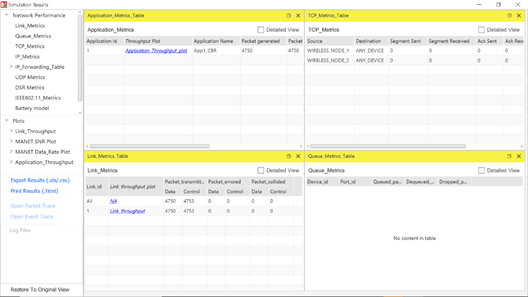
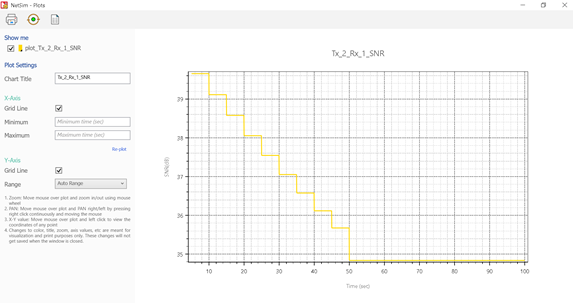
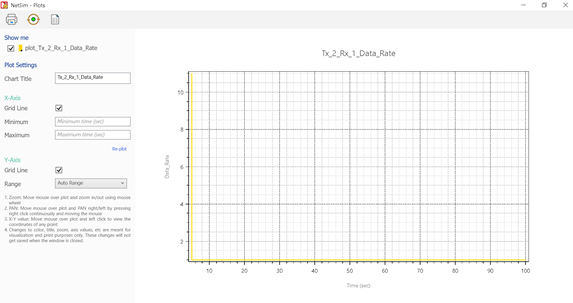
Now on running any simulation in MANET network, you will get individual SNR plots for each Tx-Rx pair, in the NetSim Metrics window under Plots ->MANET SNR Plot as shown below:
| Applicable Releases | v10.2 | v11 | v12.0 | v12.1 |
Modifications under IEEE802.11 Project:
In IEEE802_11.h:
- Add the following line in the stru_802_11_Mac_Var structure. This animHandle will be used as a handle to create SINR plots in the animation window.
void* animHandle;
In IEEE802_11.c:
- Include Animation.h in the starting of the file as a header:
#include "Animation.h"
- Add the following line as function prototype in the starting of the file just after the headers:
static void snr_add_to_animation(PIEEE802_11_MAC_VAR pb, int j);
- The code for SINR plots in the Display settings of Animation window is written inside this function.
- Add the following lines for Metric window SINR plots inside the fn_NetSim_IEEE802_11_Init() function:
int i = 0, j;
FILE* fp;
char filename[BUFSIZ], nodename[BUFSIZ];
for (i = 0; i < NETWORK->nDeviceCount; i++)
{
if (DEVICE_TYPE(i + 1) == NODE &&
DEVICE_MACLAYER(i + 1, 1)->nMacProtocolId == MAC_PROTOCOL_IEEE802_11)
{
sprintf(nodename, "plot_WIRELESS_NODE_%d_SNR", i + 1);
sprintf(filename, "%s\\%s.txt", pszIOPath, nodename);
fp = fopen(filename, "w+");
if (fp)
{
fprintf(fp, "#Type=Line\n#Heading=SNR Vs Time\n#XLabel=Time(micro sec)\n#Num_Y=1\n#YLabel=SNR(dBm)");
fclose(fp);
}
}
}
- Add the following lines for Animation window SINR plots inside the fn_NetSim_IEEE802_11_Init() function:
for (i = 0; i < NETWORK->nDeviceCount; i++)
{
if (DEVICE_TYPE(i + 1) == NODE && DEVICE_MACLAYER(i + 1, 1)->nMacProtocolId == MAC_PROTOCOL_IEEE802_11)
{
j = i + 1;
snr_add_to_animation(DEVICE_MACLAYER(j, 1),j);
}
}
- Add the following lines of code in the fn_NetSim_IEEE802_11_Metrics():
PMETRICSNODE menu = NULL;
PMETRICSNODE rmenu = NULL;
PMETRICSNODE submenu = NULL;
PMETRICSNODE submenu1 = NULL;
char filename[BUFSIZ], nodename[BUFSIZ];
int i = 0;
if (!rmenu)
rmenu = init_metrics_node(MetricsNode_Menu, "Plots", NULL);
if (!menu)
menu = init_metrics_node(MetricsNode_Menu, "MANET_PLOTS", NULL);
add_node_to_menu(rmenu, menu);
for (i = 0; i < NETWORK->nDeviceCount; i++)
{
if (DEVICE_TYPE(i + 1) == NODE && DEVICE_MACLAYER(i + 1, 1)->nMacProtocolId == MAC_PROTOCOL_IEEE802_11)
{
sprintf(nodename, "plot_WIRELESS_NODE_%d_SNR", (i + 1));
sprintf(filename, "%s\\%s.txt", pszIOPath, nodename);
submenu1 = init_metrics_node(MetricsNode_Menu, nodename, NULL);
add_node_to_menu(menu, submenu1);
submenu = init_metrics_node(MetricsNode_Plot, nodename, filename);
add_node_to_menu(submenu1, submenu);
}
}
if (menu)
write_metrics_node(metricsWriter, WriterPosition_Current, NULL, rmenu);
- Add the following lines at the end of the file to define the function for SINR in Animation Window:
static ANIM_HANDLE handle;
static void snr_add_to_animation(PIEEE802_11_MAC_VAR pb, int j)
{
static bool isCalled = false;
if (!handle)
{
handle = anim_add_new_menu(NULL,
"SNR",
false,
false,
false,
BUFSIZ,
ANIMFILETYPE_GENERIC);
}
char name[BUFSIZ];
char filename[BUFSIZ];
sprintf(name, "plot_%s_SNR", DEVICE_NAME(j));
sprintf(filename, "%s\\%s.txt", pszIOPath, name);
pb->animHandle =
anim_add_new_menu(handle,
name,
true,
true,
false,
BUFSIZ,
ANIMFILETYPE_2DPLOT);
anim_set_file_name(pb->animHandle, filename);
}
In IEEE802_11_Phy.c:
- Include the ErrorModel.h file in the header section of the file, as the SINR calculation API is declared in ErrorModel.h:
#include "ErrorModel.h"
- In the fn_NetSim_IEEE802_11_PhyIn(), add the following lines:
FILE* fp = NULL;
char filename[BUFSIZ], nodename[BUFSIZ];
double dETime = 0;
- Add the following lines in the same fn_NetSim_IEEE802_11_PhyIn() to write data into the SINR text file from where the plots are retrieved onto Metrics and Animation Windows:
sprintf(nodename, "plot_WIRELESS_NODE_%d_SNR.txt", pstruEventDetails->nDeviceId);
sprintf(filename, "%s\\%s", pszIOPath, nodename);
fp = fopen(filename, "a+");
dETime = pstruEventDetails->dEventTime;
if (fp)
{
fprintf(fp, "\n%lf,%lf", dETime, calculate_snr(pdbm, phy->dChannelBandwidth));
fclose(fp);
}
After completion of code modification build the project and create dll. where you'll get both batteryModel.dll and IEEE802.11.dll in the DLL folder replace the DLL.
Now open New Manet based network and create the network as per the network diagram given below.

To obtain a better SINR graphs and plots set the following properties as given below:
- Enable File-based Mobility in both the nodes.
- In the Application, set the Start Time = 0 sec and increase the Inter Arrival Time(Value) = 100000.
- Enable Plots(To obtain plots and animation Click on Plots->OK, Packet )
- Users need to compare the results with 3 Samples
- Sample 1: No Pathloss
- Sample 2: Pathloss Only: Log Distance = 2.5
- Sample 3: Pathloss and Fading and Shadowing: Log Distance = 2.5, Fading Model = Rayleigh, Shadowing Model = None
- Run Simulation for 1000 Seconds, since the mobility of the nodes, is set to 1000 Seconds.
Output:
You can see the output in both the animation window as well as the Result(Metrics) Window.
Output comparison
Custom Plots:
| SAMPLE 1 |  |
| SAMPLE 2 |  |
| SAMPLE 3 |  |