How to obtain a log of Receiver Sensitivity, Received Power and Phy Data Rate for 802.11 based simulations?
| Applicable Versions | NetSim Standard | NetSim Pro |
| Applicable Releases | v12 |
Receiver Sensitivity, Received Power and Phy Data Rate in 802.11 can be logged into a text or CSV file and then be plotted as per your requirement.
Following is one such example where we log these parameters into a comma-separated CSV file. The steps involved may vary between different versions of NetSim. Choose the appropriate section of this article, as per the version of NetSim.
Modifying the source codes:
| Applicable Releases | v12.0 |
- Open NetSim source code in Visual Studio by clicking on the Open Code button present in NetSim Home Screen via Open Simulation->Workspace Options->Open Code.
- Go to the IEEE802_11 project through the solution explorer and open the file IEEE802_11.c Add the lines of code highlighted in red inside the fn_NetSim_IEEE802_11_Init() function as shown below:_declspec(dllexport) int fn_NetSim_IEEE802_11_Init(struct stru_NetSim_Network *NETWORK_Formal, NetSim_EVENTDETAILS *pstruEventDetails_Formal,char *pszAppPath_Formal,char *pszWritePath_Formal,
int nVersion_Type)
{
char s[BUFSIZ];
sprintf(s, "%s", "802_11_log.csv");
FILE* fp = fopen(s, "w+");if (fp)
{
fprintf(fp, "Packet_ID,TX_ID,RX_ID,RX_POWER(dBm),RX_SENSITIVITY(dBm),DATA_RATE(Mbps)");
fclose(fp);
}
return fn_NetSim_IEEE802_11_Init_F(NETWORK_Formal,
pstruEventDetails_Formal,pszAppPath_Formal,
pszWritePath_Formal,
nVersion_Type);
} - Add the lines of code highlighted in red inside the fn_NetSim_IEEE802_11_PhyIn() function under IEEE802_11_Phy.c as shown below: int fn_NetSim_IEEE802_11_PhyIn()
{
double dFadingPower=0;
NetSim_PACKET* packet = pstruEventDetails->pPacket;
.
.
.
.
double pdbm = GET_RX_POWER_dbm(packet->nTransmitterId, ifid,
pstruEventDetails->nDeviceId,pstruEventDetails->nInterfaceId,
packet->pstruPhyData->dArrivalTime);
char s[BUFSIZ];
sprintf(s, "%s", "802_11_log.csv");
FILE* fp = fopen(s, "a+");
if (fp)
{
fprintf(fp, "\n%d,%d,%d,%f,%f,%f", pstruEventDetails->nPacketId, packet->nTransmitterId, packet-> nReceiverId, pdbm, srcPhy->dCurrentRxSensitivity_dbm, srcPhy->PHY_TYPE.ofdmPhy.dDataRate);
fclose(fp);
}
if (pdbm < srcPhy->dCurrentRxSensitivity_dbm)
{
set_radio_state(pstruEventDetails->nDeviceId, pstruEventDetails->nInterfaceId,
RX_ON_IDLE, packet->nTransmitterId,
phy->firstPacketTransmissionId ? phy->firstPacketTransmissionId : hdr->transmissions);
return -1; // dest is not in range
}
- Choose the appropriate platform (win32 /x64) according to 32-bit or 64-bit build of NetSim used.
- Now right click on the IEEE802_11 module in the solution explorer and select rebuild.
- Upon a successful build, NetSim will automatically take care of updating the respective binaries in the current workspace.
- After running any WLAN simulation, the output log file can be found in the <NetSim_Install_Directory>/bin folder. For Eg: Eg: C:\Program Files\NetSim Standard\bin
| Applicable Releases | v12.1 | v12.2 |
- Open NetSim source code in Visual Studio by clicking on the Open Code button present in NetSim Home Screen via Open Simulation->Workspace Options->Open Code.
- Go to the IEEE802_11 project through the solution explorer and open the file IEEE802_11.c Add the lines of code highlighted in red inside the fn_NetSim_IEEE802_11_Init() function as shown below:_declspec(dllexport) int fn_NetSim_IEEE802_11_Init(struct stru_NetSim_Network *NETWORK_Formal, NetSim_EVENTDETAILS *pstruEventDetails_Formal,char *pszAppPath_Formal,char *pszWritePath_Formal,
int nVersion_Type)
{
char s[BUFSIZ];
sprintf(s, "%s\\%s", pszIOLogPath, "802_11_log.csv");
FILE* fp = fopen(s, "w+");if (fp)
{
fprintf(fp, "Packet_ID,TX_ID,RX_ID,RX_POWER(dBm),RX_SENSITIVITY(dBm),DATA_RATE(Mbps)");
fclose(fp);
}
return fn_NetSim_IEEE802_11_Init_F(NETWORK_Formal,
pstruEventDetails_Formal,pszAppPath_Formal,
pszWritePath_Formal,
nVersion_Type);
} - Add the lines of code highlighted in red inside the fn_NetSim_IEEE802_11_PhyIn() function under IEEE802_11_Phy.c as shown below: int fn_NetSim_IEEE802_11_PhyIn()
{
double dFadingPower=0;
NetSim_PACKET* packet = pstruEventDetails->pPacket;
.
.
.
.
double pdbm = GET_RX_POWER_dbm(packet->nTransmitterId, ifid,
pstruEventDetails->nDeviceId,pstruEventDetails->nInterfaceId,
packet->pstruPhyData->dArrivalTime);
char s[BUFSIZ];
sprintf(s, "%s\\%s", pszIOLogPath, "802_11_log.csv");
FILE* fp = fopen(s, "a+");
if (fp)
{
fprintf(fp, "\n%d,%d,%d,%f,%f,%f", pstruEventDetails->nPacketId, packet->nTransmitterId, packet-> nReceiverId, pdbm, srcPhy->dCurrentRxSensitivity_dbm, srcPhy->PHY_TYPE.ofdmPhy.dDataRate);
fclose(fp);
}
if (pdbm < srcPhy->dCurrentRxSensitivity_dbm)
{
set_radio_state(pstruEventDetails->nDeviceId, pstruEventDetails->nInterfaceId,
RX_ON_IDLE, packet->nTransmitterId,
phy->firstPacketTransmissionId ? phy->firstPacketTransmissionId : hdr->transmissions);
return -1; // dest is not in range
}
- Choose the appropriate platform (win32 /x64) according to 32-bit or 64-bit build of NetSim used.
- Now right click on the IEEE802_11 module in the solution explorer and select rebuild.
- Upon a successful build, NetSim will automatically take care of updating the respective binaries in the current workspace.
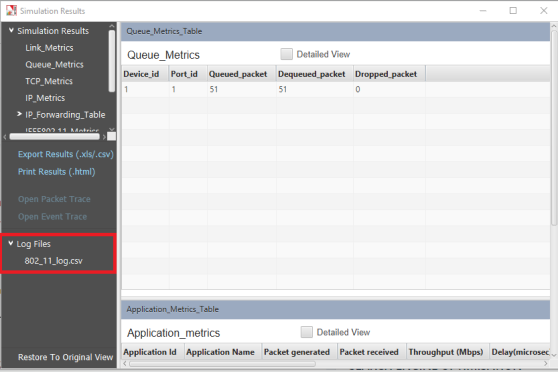
- Now on running any simulation in IEEE802.11, you will get a log file containing Receiver Sensitivity, Received Power and Phy Data Rate, which can be opened from the results dashboard as follows:
Note:
The above code modifications are applicable for WLAN standards such as 802.11 a, g and p. In case of standards such as 802.11 n and ac modify the line
In case of standard 802.11b, modify the line
as
Result and Analysis:
The log file containing Receiver Sensitivity, Received Power and Phy Data Rate will be as shown below: 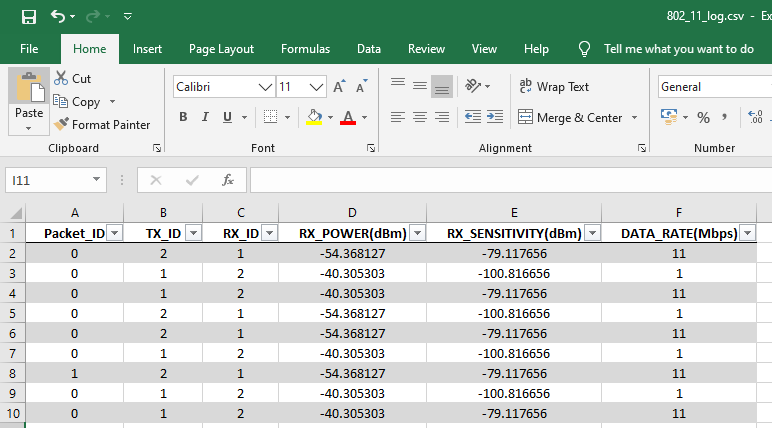
Related articles:
- https://support.tetcos.com/portal/en/kb/articles/how-do-i-write-code-to-see-the-received-power-in-a-simple-two-node-wireless-system
- https://support.tetcos.com/portal/en/kb/articles/what-is-the-netsim-api-to-calculate-received-power-between-two-wireless-nodes-in-wlan
- https://support.tetcos.com/portal/en/kb/articles/what-are-the-different-phy-rates-in-802-11b
- https://support.tetcos.com/portal/en/kb/articles/how-is-the-phy-rate-decided-in-netsim-802-11