How to obtain the total packets transmitted by each device with respect to time in LTE?
| Applicable Versions | NetSim Standard | NetSim Pro |
Note: Please scroll down to see the code modifications for appropriate releases.
| Applicable Releases | v13 |
The total packets transmitted by each device with respect to time can be obtained as a log file by following the steps given below:
i.Open NetSim source code in Visual Studio 2019 through Your Work-> workspace options->open code option.
ii. Go to the LTE_NR project through the solution explorer and open the file LTE_NR.h. Add the lines of code highlighted in red as shown below:
#ifndef _NETSIM_LTE_NR_H_
#define _NETSIM_LTE_NR_H_
int PACKETS_SENT[100];
#pragma region HEADER_FILES_AND_WARNING_REMOVAL
#include "List.h"
#pragma warning ( disable : 4090 )
#pragma warning ( disable : 4100 )
#pragma warning ( disable : 4189 )
#pragma warning ( disable : 4244 )
#pragma endregion
iii. In the file, LTE_NR.c make the following changes(highlighted in red) in the fn_NetSim_LTE_NR_Init() function:
_declspec(dllexport) int fn_NetSim_LTE_NR_Init()
{
FILE* fp;
char filename[BUFSIZ];
int i = 0, enb_count = 0;
sprintf(filename, "LTE_PACKET_TRANSMITTED.csv");
fp = fopen(filename, "w+");
if (fp)
{
fprintf(fp, "SIMULATION_TIME(micro sec),DEVICE_ID,TOTAL_PACKETS_TRANSMITTED");
fclose(fp);
}
return fn_NetSim_LTE_NR_Init_F();
}
iv. In the file, LTE_NR.c make the following changes(highlighted in red) in the fn_NetSim_LTE_NR_Run function under the case PHYSICAL_IN_EVENT:
case PHYSICAL_IN_EVENT:
{
FILE* fp;
int device_id = 0;
char logname[BUFSIZ];
if(!isLTENRControlPacket(pstruEventDetails->pPacket))
fn_NetSim_Metrics_Add(pstruEventDetails->pPacket);
fn_NetSim_WritePacketTrace(pstruEventDetails->pPacket);
device_id = pstruEventDetails->pPacket->nTransmitterId;
PACKETS_SENT[device_id]++;
LTENR_CallRLCIn();
sprintf(logname, "LTE_PACKET_TRANSMITTED.csv");
fp = fopen(logname, "a+");
if (fp)
{
fprintf(fp, "\n%f,%d,%d", pstruEventDetails->dEventTime, device_id, PACKETS_SENT[device_id]);
fclose(fp);
}
}
break;
default:
fnNetSimError("LTE-NR, Unknown event type %d.\n",
pstruEventDetails->nEventType);
break;
}
v.Now right click on the LTE_NR module in the solution explorer and select rebuild.
vi. Upon a successful build, the LTE_NR binaries will automatically get updated in the bin folder of the current workspace.
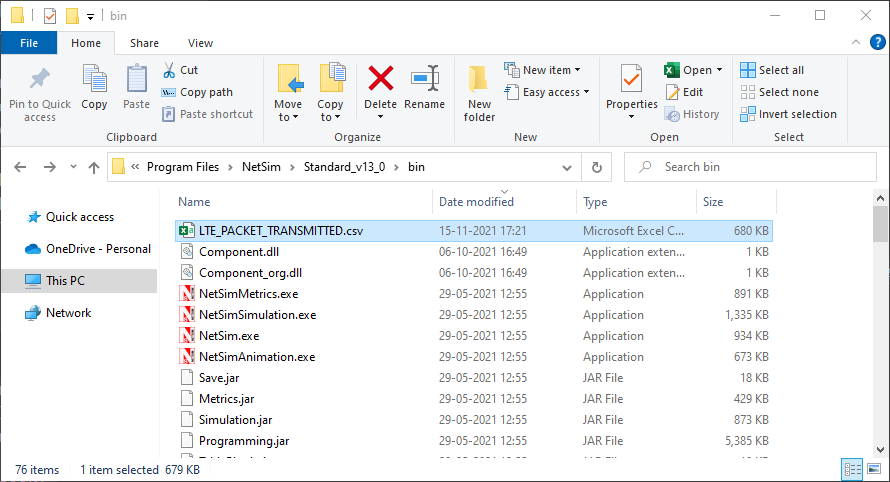
viii. Now on running any simulation in LTE or 5G, you will get a log file which contains the details of packets transmitted by each device with respect to time, in the bin folder of NetSim (“<NetSim_Install_Directory>/bin”) as shown below:
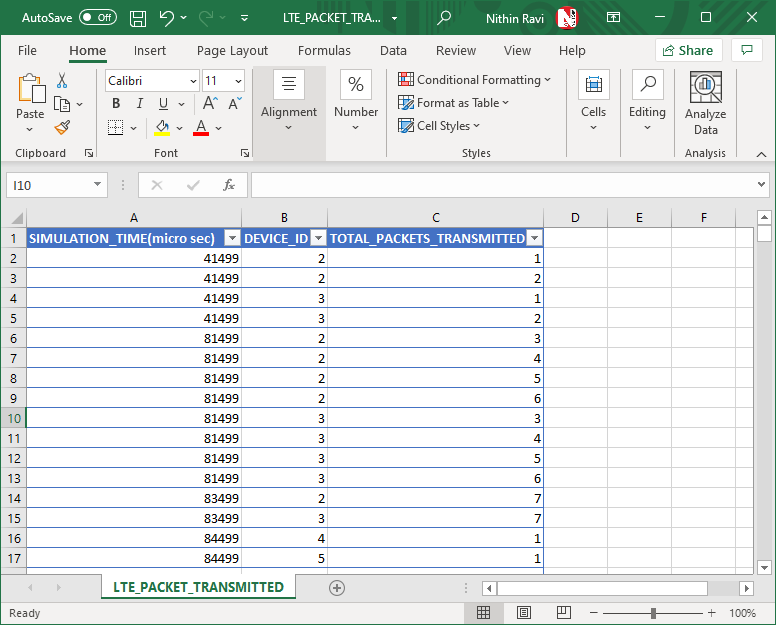
The file contains the fields - SIMULATION_TIME(micro-sec),DEVICE_ID and TOTAL_PACKETS_TRANSMITTED. Further, the spreadsheet can be formatted as a table in MS Excel and data can be filtered based on the DEVICE_ID.
| Applicable Releases | v11 | v12 |
The total packets transmitted by each device with respect to time can be obtained as a log file by following the steps given below:
i.Open NetSim source code in Visual Studio 2019 through Open simulation-> workspace options->open code option.
ii.Go to LTE project through the solution explorer and open the file LTE.h. Add the lines of code highlighted in red as shown below:
#include "LTE_enum.h"
#include "PDCP.h"
#include "CA.h"
#include "MIMO.h"
int PACKETS_SENT[100];
/***** Default Config Parameter ****/
#define LTE_TX_POWER_DEFAULT20//mw
iii. In the file, LTE.c make the following changes(highlighted in red) in the fn_NetSim_LTE_Init() function:
_declspec(dllexport) int fn_NetSim_LTE_Init()
{
FILE *fp;
char filename[BUFSIZ];
int i = 0, enb_count = 0;
sprintf(filename, "LTE_PACKET_TRANSMITTED.csv");
fp = fopen(filename, "w+");
if (fp)
{
fprintf(fp, "SIMULATION_TIME(micro sec),DEVICE_ID,TOTAL_PACKETS_TRANSMITTED");
fclose(fp);
}
return fn_NetSim_LTE_Init_F();
}
iv. In the file, LTE.c make the following changes(highlighted in red) in the fn_NetSim_LTE_Run() function under the case PHYSICAL_IN_EVENT:
case PHYSICAL_IN_EVENT:
{
FILE *fp;
int device_id = 0;
char logname[BUFSIZ];
unsigned int carrier_index = get_carrier_index(pstruEventDetails->pPacket);
if(pstruEventDetails->nDeviceType==eNB)
{
LTE_ASSOCIATEUE_INFO* info=fn_NetSim_LTE_FindInfo(get_enb_mac(pstruEventDetails->nDeviceId,1),pstruEventDetails->pPacket->nTransmitterId);
if(!info)
{
//Handover is in progress
pstruEventDetails->pPacket->nPacketStatus = PacketStatus_Dropped;
fn_NetSim_WritePacketTrace(pstruEventDetails->pPacket);
fn_NetSim_Metrics_Add(pstruEventDetails->pPacket);
return -1;
}
}
device_id = pstruEventDetails->pPacket->nTransmitterId;
PACKETS_SENT[device_id]++;
if(fn_NetSim_LTE_DecideError(carrier_index))
{
pstruEventDetails->nEventType=MAC_IN_EVENT;
fnpAddEvent(pstruEventDetails);
}
sprintf(logname, "LTE_PACKET_TRANSMITTED.csv");
fp = fopen(logname, "a+");
if (fp)
{
fprintf(fp, "\n%f,%d,%d", pstruEventDetails->dEventTime, device_id, PACKETS_SENT[device_id]);
fclose(fp);
}
fn_NetSim_WritePacketTrace(pstruEventDetails->pPacket);
fn_NetSim_Metrics_Add(pstruEventDetails->pPacket);
}
break; //PHYSICAL_IN
v.Now right click on the LTE module in the solution explorer and select rebuild.
vi. Upon a successful build, the libLTE.dll file will automatically get updated in the binary folder of the current workspace.
viii. Now on running any simulation in LTE, you will get a log file which contains the details of packets transmitted by each device with respect to time, in the bin folder of NetSim (“<NetSim_Install_Directory>/bin”) as shown below:

The file contains the fields - SIMULATION_TIME(micro-sec),DEVICE_ID and TOTAL_PACKETS_TRANSMITTED. Further, the spreadsheet can be formatted as a table in MS Excel and data can be filtered based on the DEVICE_ID.
