How to perform SlowHTTPtest DOS attack through NetSim Emulator?
About Slowhttptest
SlowHTTPTest is a highly configurable tool that simulates some Application Layer Denial of Service attacks by prolonging HTTP connections in different ways.
It can be used to test your web server for DOS vulnerabilities, or just to figure out how many concurrent connections it can handle. SlowHTTPTest works on the majority of Linux platforms, OS X and Cygwin - a Unix-like environment and command-line interface for Microsoft Windows and comes with a Docker file to make things even easier.
Performing Emulation using Slowhttptest
LAB - Setup

The IP address in the above setup:
| SYSTEM 1 | Web Client (slowhttptest) | 192.168.0.100 |
| SYSTEM 2 | Web Server | 192.168.0.101 |
| SYSTEM 3 | NetSim Emulation Server | 192.168.0.102 |
Static Route:
System Configuration
Connecting devices involved in database application to NetSim emulator involves configurations at both the systems that run the web server and the web client.
Static routes should be set to route all outgoing packets to the system running NetSim Emulator.
To send packets exchanged between System 1 and System 2 via System 3(NetSim Emulator), the following settings are to be done:
System 1: The route is added to send any packet to System 2, to the NetSim Emulator interface that is connected to it.
System 2: The route is added to send any packet to System 1, to the NetSim Emulator interface that is connected to it.
After performing the above settings, packets from System 1 to System 2 will take the following route: System 1(Web Client) -> System 3(NetSim Emulator)-> System 2(Apache Web server) And vice versa for packets from System 2 to System 1
Steps to start SlowHttpTest
- Download and Install SlowHTTPTest from https://tools.kali.org/stress-testing/slowhttptest
- After installation run the following command
- slowhttptest -c 150 -H -g -o slowhttp -i 10 -r 200 -t GET -u http://192.168.0.101 -x 24 -p 3

- slowhttptest -c 150 -H -g -o slowhttp -i 10 -r 200 -t GET -u http://192.168.0.101 -x 24 -p 3
The above command will initiate 150 concurrent connections to the Web server "http://192.168.0.101", since the Apache server currently supports a maximum of 150 concurrent connections.
Steps to configure the application for NetSim Emulation
Once the Slowhttptest connection is established, In System 3, create a simple scenario in internetworks as shown below
 Network Topology
- Configure an Emulation Application from Wired Node 2 to Wired Node 3 as shown below:
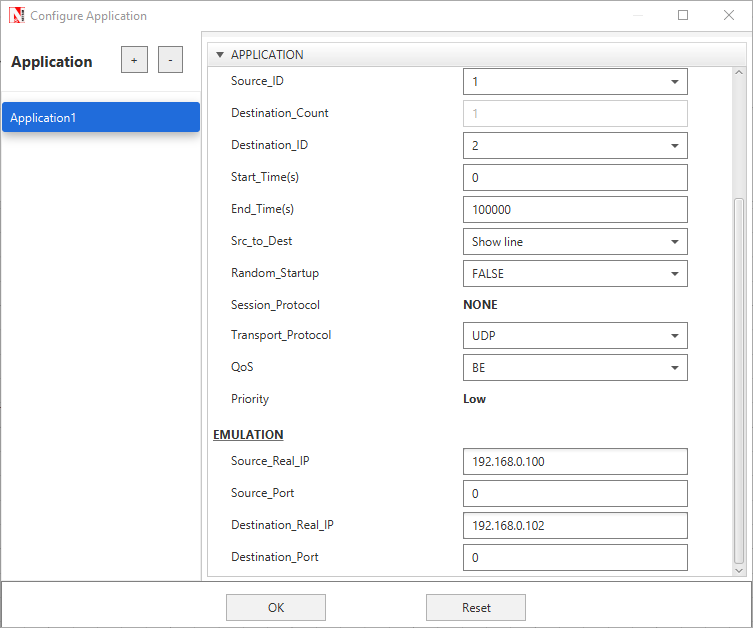
The above settings will ensure that packets from System 1 to System 2 and vice versa will be sent via NetSim Emulator.
Results and Analysis
- Start Simulation in NetSim
- Analyze the impact of the flow of the packets through the network designed in NetSim
- The pcap log files such as All Network Packets Capture, Dispatched to Emulator, Reinjected from Emulator, Not Dispatched to Emulator that are accessible from the NetSim results dashboard after the simulation is over, can be used for further analysis.