How to visualize the RPL DoDAG in NetSim IoT simulations?
| Applicable Versions | NetSim Academic | NetSim Standard | NetSim Pro |
| Applicable Releases | v14.0 |
Introduction
Users have the capability to visualize the Directed Acyclic Graph (DAG) structure in an Internet of Things (IoT) Routing Protocol for Low-Power and Lossy Networks (RPL) network using the RPL DoDAG Visualizer tool. NetSim offers visualization utilities for both Python and MATLAB, with download links available in the subsequent sections.
Methodology
- Packet trace logs from NetSim record packet flows, timestamps, and detailed information. By applying filters, to the packet trace log, you can identify DoDAG nodes and edges.
- Ranks of nodes advertised in DIO messages can be determined from Wireshark logs. Note that the wireshark PCAP file names correspond to node names.
An example
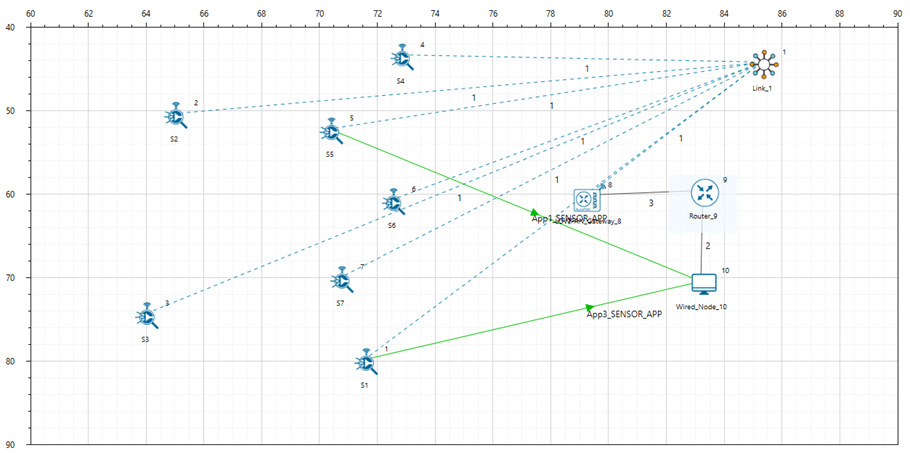
Fig: In this example, we have considered 1 Gateway(Root node), 7 sensors working over RPL protocol in the network layer with pathloss set to Log distance with pathloss exponent: 2
Link Quality and Rank Calculation:
- Link Quality is depending on Received power and Receiver Sensitivity of the nodes in the network .
 Where ‘p’ is the received power and the ‘’rs’ is the receiver sensitivity
- The Rank calculation is depending on the Link quality
 Where ‘Maxincrement= 16 and Minicrement=1 according to https://www.rfc-editor.org/rfc/rfc6550#se
Log file to visualize the DODAG
The input files required to run the utility and generate the DoDAG are as follows:
- Packet Trace.csv (mandatory) - Read to obtain the following information
- DAO messages exchanged between nodes
- DoDAG nodes and edges
- Configuration.netsim (mandatory) - Read to obtain the following information
- Node ID
- Node Name
- Node Position
- Node IP Address
- Wireshark Capture files (optional) - Read to obtain the following information
- DIO messages transmitted by node
- Rank computed
How to enable Wireshark and Packet Trace in NetSim
To enable packet capture in Wireshark, right click on the device where wireshark should be run. In the properties, go to General Properties and set the Wireshark Capture parameter as Online.
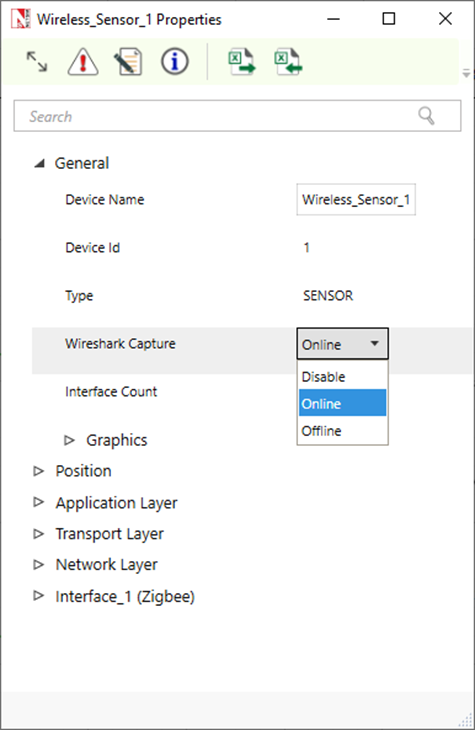
Enable Wireshark in General Properties
To enable packet trace click on Configure Reports tab and enable Packet trace as shown in the below figure.
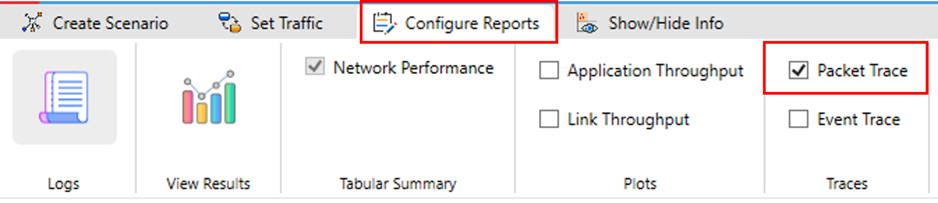
Packet trace option in ribbon
Python utility download and setup
Project Download Link (with source code): DoDAG Visualizer Download
Follow the steps given below
- Download and extract the DAG_Generator.exe application file from the above link.
- The DAG_Generator.exe takes the following arguments
- <PATH of Saved IoT RPL experiment> (mandatory) containing packet trace, Configuration.netsim, and Wireshark logs.
- <PATH of Wireshark Installation directory> (optional) - The code by default uses the path "C:\Program Files\Wireshark" as the Wireshark Installation path from where it calls the tshark.exe application. If the path is different then it can be passed as a second argument.
DAG_Generator.exe <PATH OF SAVED IoT RPL Experiment with Packet Trace enabled>

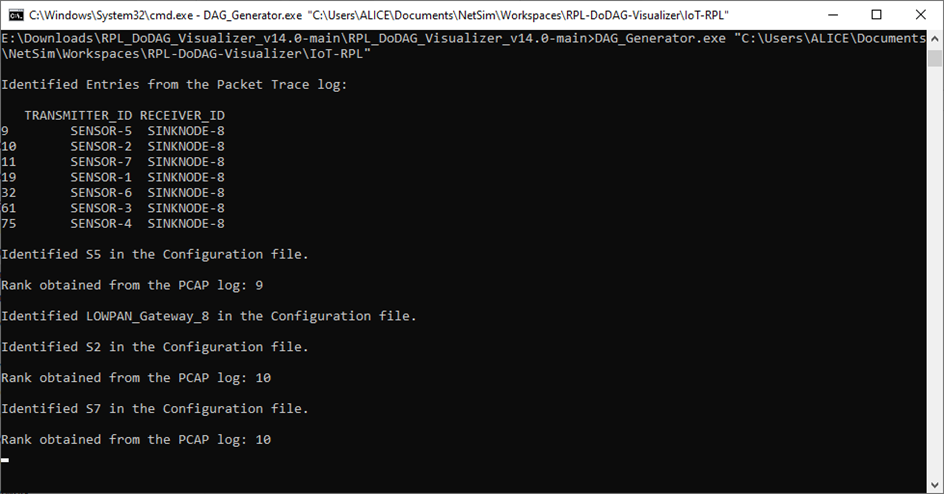
Upon running the executable via the command line, it generates a DoDAG plot based on the network scenario saved.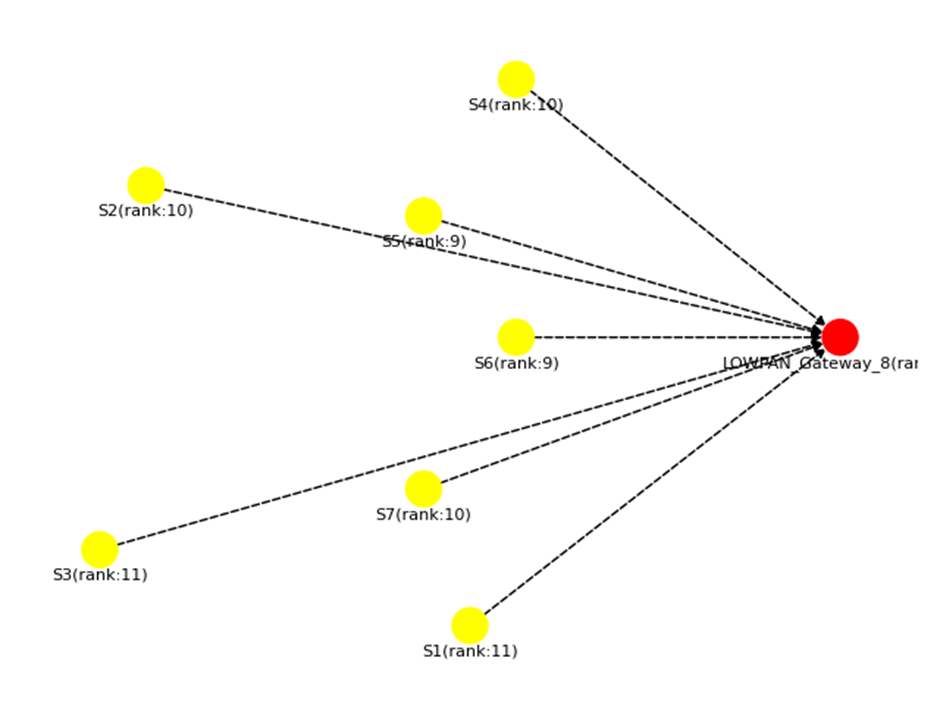
Visualizing DoDAG for the scenario when using the log-distance pathloss model
Users can observe the the DODAG based on the settings configured in the network scenario within NetSim.
Observing DoDAG Changes with Range-Based Pathloss Model
Consider the same scenario in NetSim, with the pathloss model is set as range-based with a range of 10 meters. The changes in the DoDAG can be seen as shown below.
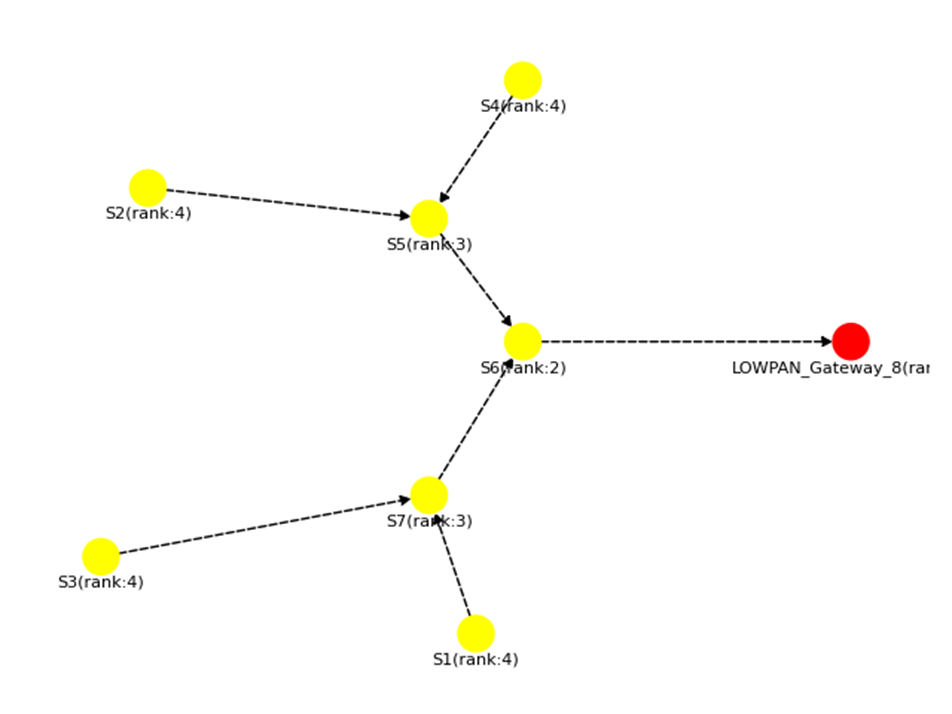
Visualizing DoDAG with Range-Based Pathloss
MATLAB Utility
In the case of Standard and Pro versions of NetSim, the DoDAG plot can be generated during runtime using MATLAB using the RPL DoDAG visualization project available in TETCOS file exchange (https://www.tetcos.com/file-exchange.html).
With the MATLAB utility, users can configure node mobility and observe the changes in the DoDAG during runtime.
Observing DoDAG changes through File-Based Mobility using MATLAB
In NetSim, there is an option called "File-Based Mobility" where users can specify the trajectory of nodes. In the above scenario, we have configure mobility for S2 device, as shown below
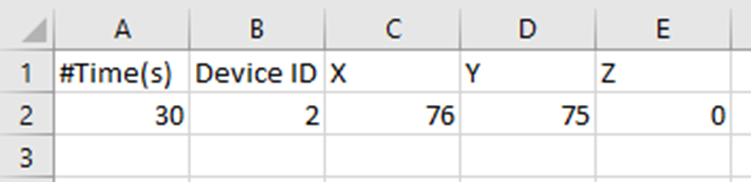
Node S2 moves at t = 30s to the new co-ordinates (76, 75, 0)
DODAG prior to mobility
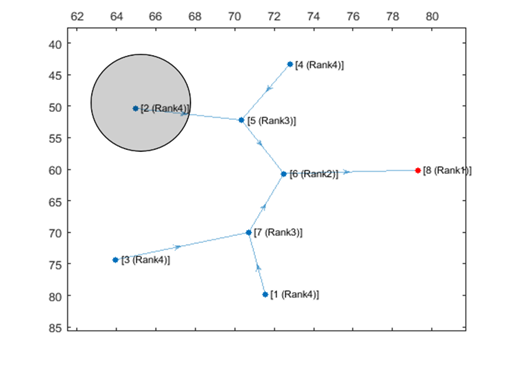
DODAG post mobility
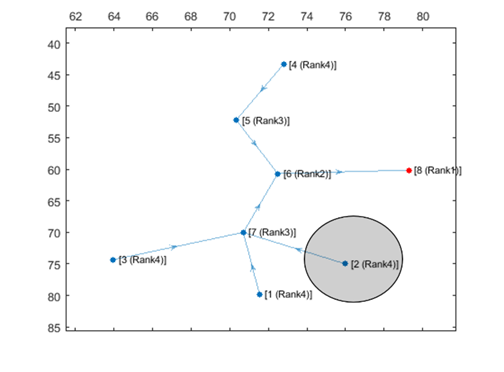
Fig: Node S2 is initially in its starting position and after 30 seconds, it changes its position to the new coordinates specified in the CSV file. Observe how the DODAG changes as the node moves.