Replace the NetSim Results window with a custom metrics window
Applies to: NetSim Acad/Pro/Std versions v14/v15
NetSim launches NetSimAdvancedMetrics.exe after a simulation to display the Results window. If your organization uses its own metrics application, you can place a compatible replacement at the location from which NetSim launches this executable.
How the Results window is launched
In the ticket example, the NetSim GUI launches:
C:\Program Files\NetSim\Pro_v14_4\bin\net7.0-windows\NetSimAdvancedMetrics.exeThe program reads simulation metrics and related output files from the NetSim run-time output folder. A typical v14.4 example is:
C:\Users\<user>\AppData\Local\Temp\NetSim\pro_14.4\The saved run-time location is the IOPath entry in:
%APPDATA%\NetSim\<edition_version>\Settings.txtUse the configured IOPath instead of hard-coding a user name or temporary folder in the replacement application.
Can the Results window launch be disabled?
The post-simulation call is made by the NetSim GUI. Its source and configuration are not available for user modification. Removing or renaming NetSimAdvancedMetrics.exe without providing a replacement does not disable the call; NetSim still tries to start the program and displays an error.
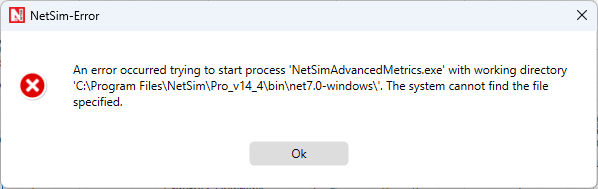
Figure 1: Error produced when the executable expected by the NetSim GUI is unavailable.
Replace the Results window
- Close NetSim.
- Open the installed NetSim binary folder. In the ticket example, this is:
C:\Program Files\NetSim\Pro_v14_4\bin\net7.0-windows\ - Back up the shipped executable. For example, rename
NetSimAdvancedMetrics.exetoNetSimAdvancedMetrics_backup.exe. - Build your custom metrics application as a Windows executable.
- Name the custom executable
NetSimAdvancedMetrics.exe. - Place it in the same binary folder.
- Configure the application to read the simulation output from the
IOPathstored in the current user'sSettings.txt. If required by the application, per-user NetSim settings are under%APPDATA%\NetSim\<edition_version>\. - Start NetSim and run a test simulation. After the run, confirm that NetSim opens the custom application and that the application loads the expected metrics.
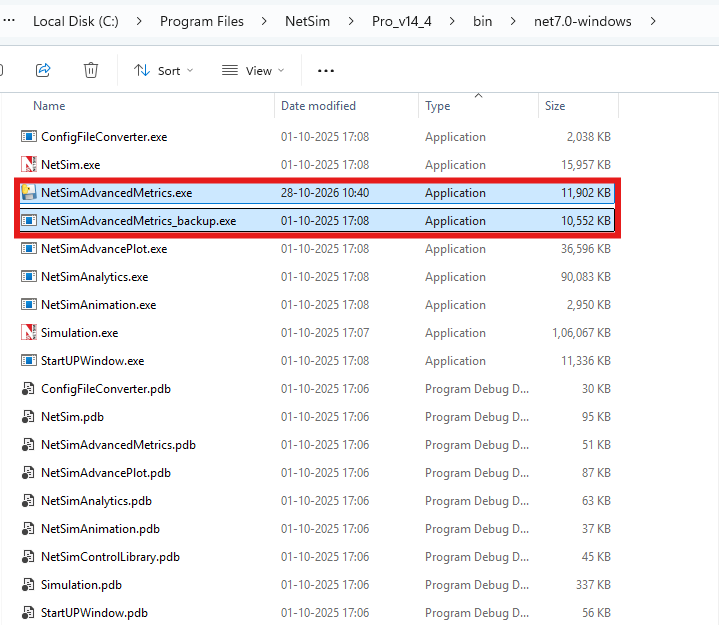
Figure 2: Example binary folder with the shipped executable backed up and the replacement application named NetSimAdvancedMetrics.exe.
Implementation notes
- Do not assume that
IOPathis the default temporary folder. A user can change it, and command-line runs can override it.