Understanding OLSR route discovery procedure using route table logs
| Applicable Versions | NetSim Standard | NetSim Pro |
| Applicable Releases | v12 | v13 |
OLSR Route Table updates in MANET
Consider the simple MANET network where Node 1 has to communicate with Node 5 using OLSR protocol for establishing the routes as shown below (associated experiment configuration is attached herewith):
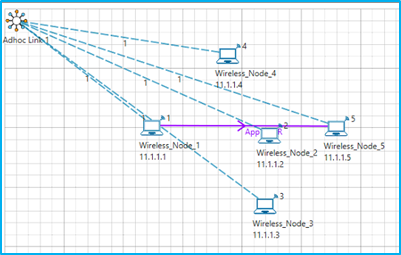
The nodes do not have pre-established routes. The route table of every node can be obtained from the log files where the route table gets updated every 2sec. The values mentioned in the document correspond to the first interval route table values of the log file.
The OLSR route table entries discussed in the following explanation were obtained from OLSR route table log files which can be generated by modifying the source codes as explained in the article:
https://support.tetcos.com/a/solutions/articles/14000113347
The Route Table is created or updated only when NDP_HELLO or OLSR_TC messages are received by the corresponding nodes
Settings done in the Network:
- Grid length: 500m*500m
- Disable mobility in all nodes
- Configure CBR application with Transport Protocol to UDP in Application Properties with source node as node 1 and destination node as node 5.
- Channel characteristics: Path loss only, Path loss model: Log Distance, Path loss exponent: 4
- Set OLSR routing protocol under network layer properties in all nodes
- Enable Packet Trace
- Run simulation for 30 seconds
OLSR Route Table updates analysis
- Node 1 has to send data to Node 5 as shown in the scenario. In order for the data transmission to happen the route discovery process takes place at first. The Hello Messages are first exchanged between the nodes to obtain the information to select the MPR nodes, neighbor detection, and link sensing as shown in Figures 1-3
Figure 1: Wireless_Node_1:
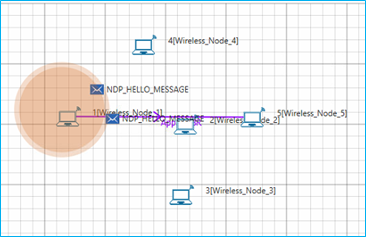
Figure 2: Wireless_Node_2:
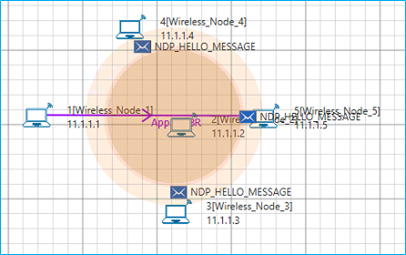
Figure 3: Wireless_Node_5:
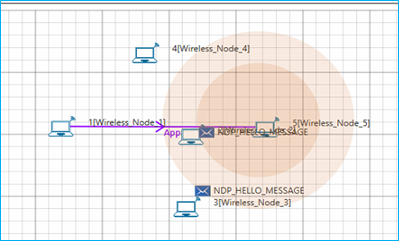
2. Each node selects its MPR set from among its 1-hop symmetric neighbors. This set is selected such that it covers (in terms of radio range) all symmetric strict 2-hop nodes.
3. The MPR nodes thus selected will broadcast the TC Messages (Topology Control Message) as shown in Figures 4-6
Figure 4: Wireless_Node_2:
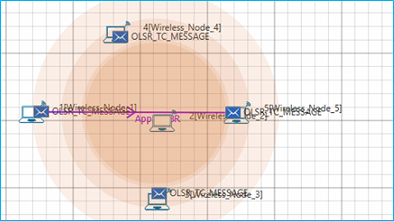 Figure 5: Wireless_Node_1:
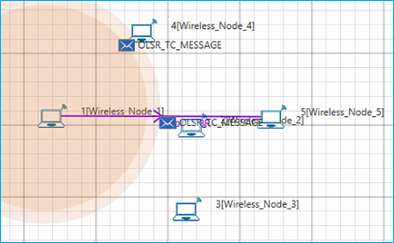
Figure 6: Wireless_Node_5:
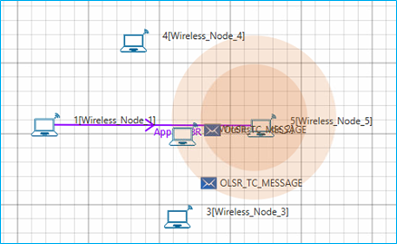
4. Upon receiving the TC Messages, the nodes form the Neighbour Information Base containing Neighbour-Set, 2-Hop-Neighbor-Set, MPR-Set, MPR-Selector-Set, The values in these sets are used for route table calculation and the route tables are formed for every node as shown in the table.
5. One of the nodes in the MPR Set of node 1, is selected to forward the data packets to the destination. In this scenario, node 2 is chosen as the MPR of node 1 since it’s a one-hop symmetric neighbor that covers the destination node as well as other nodes in the scenario
6. The Hello messages are transmitted every 2sec and the route table gets updated every time the hello messages are exchanged
Table 1: Wireless_Node_1:
| R_dest_addr | R_next_addr | R_dist | R_iface_addr |
11.1.1.4 | 11.1.1.4 | 1 | 11.1.1.1 |
11.1.1.3 | 11.1.1.2 | 2 | 11.1.1.1 |
11.1.1.5 | 11.1.1.2 | 2 | 11.1.1.1 |
Table 2: Wireless_Node_2:
| R_dest_addr | R_next_addr | R_dist | R_iface_addr |
11.1.1.4 | 11.1.1.4 | 1 | 11.1.1.2 |
Table 3: Wireless_Node_3:
R_dest_addr | R_next_addr | R_dist | R_iface_addr |
11.1.1.2 | 11.1.1.2 | 1 | 11.1.1.3 |
11.1.1.4 | 11.1.1.2 | 2 | 11.1.1.3 |
11.1.1.1 | 11.1.1.2 | 2 | 11.1.1.3 |
Table 4: Wireless_Node_4:
R_dest_addr | R_next_addr | R_dist | R_iface_addr |
11.1.1.2 | 11.1.1.2 | 1 | 11.1.1.4 |
11.1.1.3 | 11.1.1.2 | 2 | 11.1.1.4 |
11.1.1.5 | 11.1.1.2 | 2 | 11.1.1.4 |
Table 5: Wireless_Node_5:
R_dest_addr | R_next_addr | R_dist | R_iface_addr |
11.1.1.2 | 11.1.1.2 | 1 | 11.1.1.5 |
11.1.1.4 | 11.1.1.2 | 2 | 11.1.1.5 |
11.1.1.1 | 11.1.1.2 | 2 | 11.1.1.5 |