5G Example: Performance analysis involving handovers for large number (50) UEs
| Applicable Versions | NetSim Standard | NetSim Pro |
| Applicable Release | v14.0 |
The 5G handover procedure implemented in NetSim is based on the Strongest Adjacent Cell Handover Algorithm (Ref: Handover within 3GPP LTE: Design Principles and Performance. Konstantinos Dimou. Ericcson Research).
The algorithm enables each UE to connect to that gNB which provides the highest Reference Signal Received Power (RSRP). Therefore a handover occurs the moment a better gNB (the adjacent cell has offset stronger RSRP, measured as SNR in NetSim) is detected.
This algorithm is similar to 38.331, 5.5.4.4 Event A3 wherein Neighbor cell’s RSRP becomes Offset better than serving cell’s RSRP. Note that in NetSim report-type is periodical and not eventTrigerred since NetSim is a discrete event simulator and not a continuous-time simulator.
This algorithm is susceptible to ping-pong handovers; continuous handovers between the serving and adjacent cells on account of changes in RSRP due to mobility and shadow-fading. At one instant the adjacent cell's RSRP could be higher and at the very next it could be the original serving cell's RSRP, and so on.
To solve this problem the algorithm uses:
- Hysteresis (Hand-over-margin, HOM) which adds an RSRP threshold (Adjacent_cell_RSRP - Serving_cell_RSRP > Hand-over-margin or hysteresis), and
- Time-to-trigger (TTT) adds a time threshold
This HOM is part of NetSim implementation while TTT can be implemented as a custom project in NetSim.
Network Scenario:
The RAN part consists of 50 UEs which are connected to a gNB and the distance between the gNB and all the UEs are 100m. The gNB is in turn connected to a 5G Core which is connected to the server, which consists of a Router and a Wired Node.
The UEs are subjected to move in the downward direction using File-Based Mobility so that the control is handed over from one gNB to the other. (The scenario has a UE connected to gNB 60, because NetSim requires every gNB to be connected to atleast one UE)
The network traffic is modeled in such a way that all the UEs can handle both Upload and Download simultaneously. The total upload traffic has a Generation Rate of 500 Mbps and the total download traffic has a Generation rate of 400 Mbps
(Experiment files attached- Refer: How to import NetSim Experiments and Configuration files? to import the experiment file in NetSim)
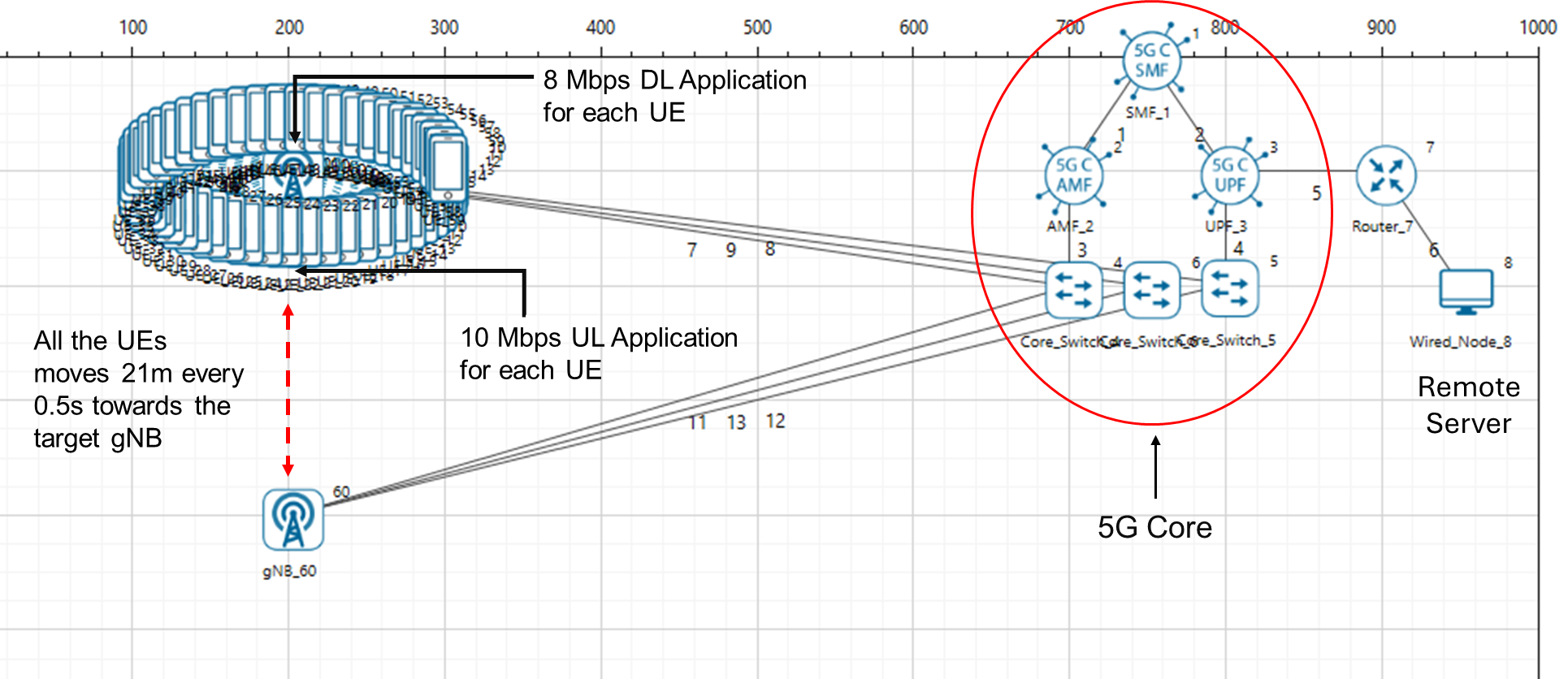
Properties configured in the network scenario:
The following parameters were configured in the Interface LTE_NR of gNB:
Parameter | Value |
gNB Height | 10 m |
Tx Power | 40 dBm |
TX Antenna Count | 2 |
RX Antenna Count | 2 |
CA Type | Single Band |
CA Configuration | n78 |
DL: UL | 1:4 |
Numerology | 1 |
Channel Bandwidth | 100 MHz |
MCS Table | QAM64 |
CQI Table | Table 1 |
Outdoor Scenario | Urban Macro |
Pathloss Model | 3GPPTR38.901-7.4.1 |
LOS NLOS Selection | User-Defined |
LOS Probability | 0 |
| UE Parameter | |
TX Antenna Count | 2 |
RX Antenna Count | 2 |
| Simulation Parameter | |
| Packet Trace | Enabled |
| Plots | Enabled |
| LTENR Radio Measurements Log | Enabled |
| Simulation Time | 10 s |
The following values were set in the Application configuration window:
Download Application Properties | (App51_CBR to App100_CBR) |
Source Id | 8 |
Destination Id | UE_Id |
Packet Size | 1460 Bytes |
IAT | 1460 µs |
Generation Rate | 8 Mbps each |
Start Time | 1 s |
Transport Protocol | UDP |
Upload Application Properties | (App1_CBR to App50_CBR) |
Source Id | UE_Id |
Destination Id | 8 |
Packet Size | 1460 Bytes |
IAT | 1168 µs |
Generation Rate | 10 Mbps each |
Start Time | 1 s |
Transport Protocol | UDP |
Results and Observations:
The time at which the UEs were handed over from the Serving gNB to the Target gNB can be observed using the NetSim Packet Trace file.
The Packet Trace and Plots can be opened from the Results Dashboard window
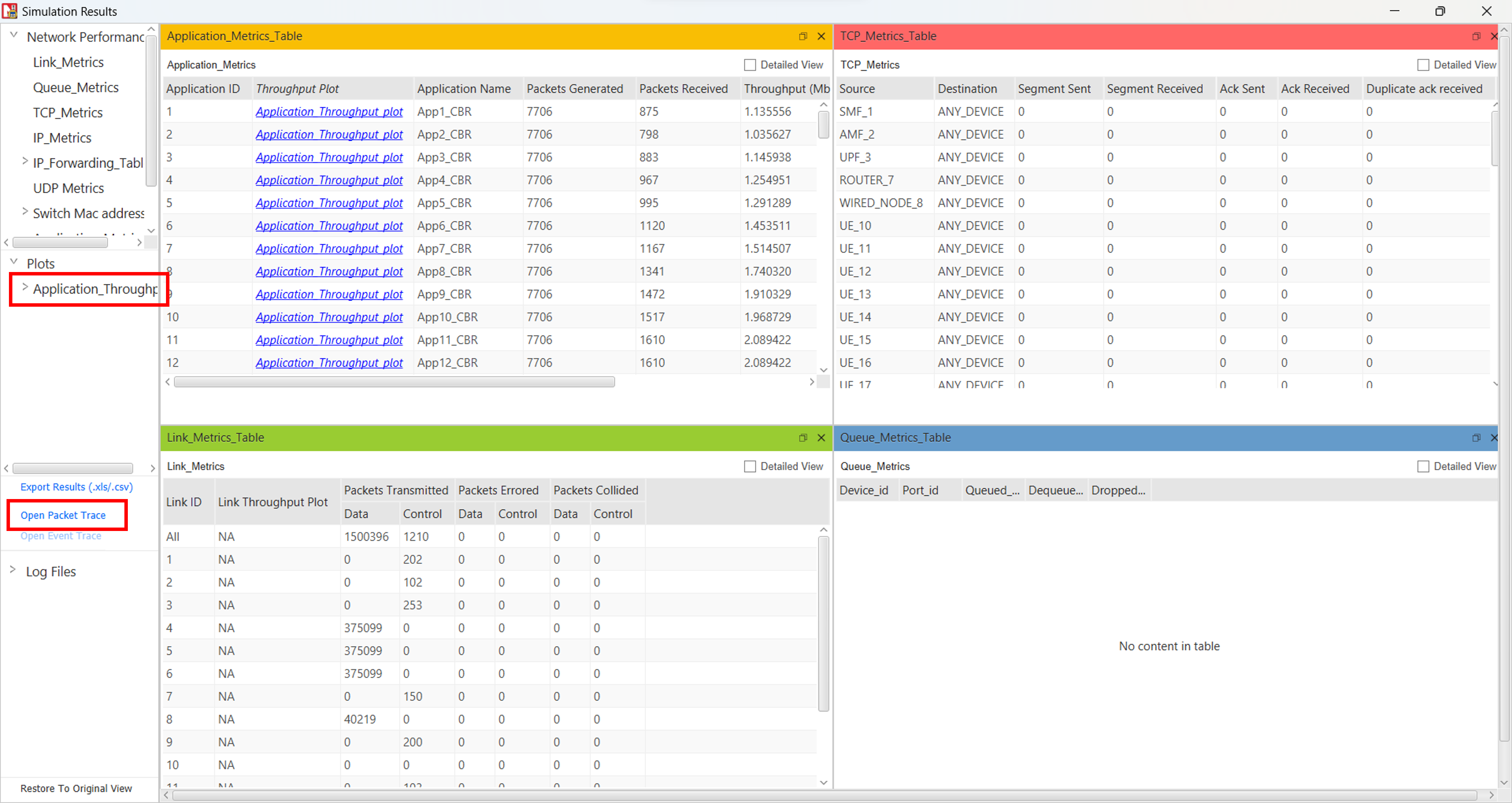
In Packet Trace, filter Control Packet Type to Handover Request. The Handover Request is sent from gNB9 to gNB60 (for each UE) at 1.56 seconds. The time at which each UE is handed over to the second gNB is different due to the movement of the UEs and also the position of the UEs
Note: Excel imposes a limit of 1 million rows. Hence, users can either simulate a scenario with a lesser number of applications or use a DB/tool which supports > 1 million rows. NetSim saves the packet trace in .csv format.
Refer to the following article Opening large Netsim packet event trace files and generating pivot tables plots to view csv file with rows > 1 million.
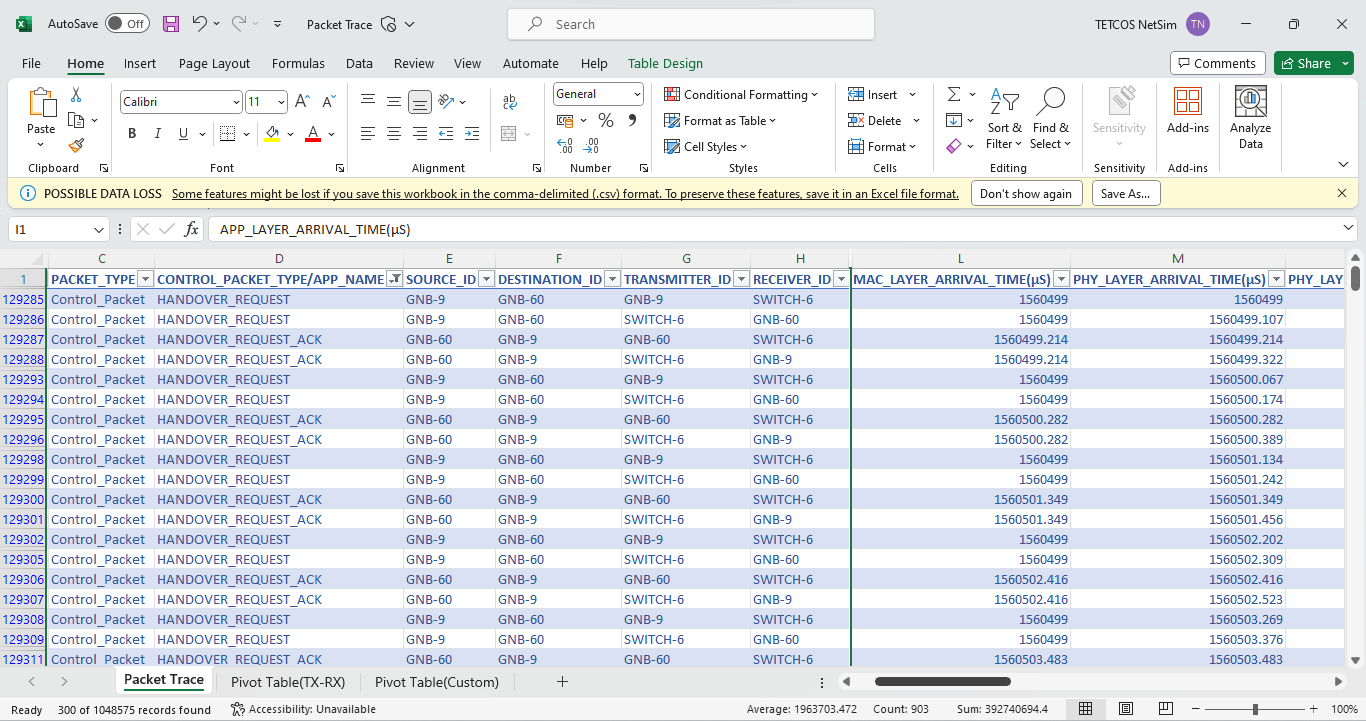
The control of the UEs is passed to the Target gNB when the SNR of the Target gNB exceeds the SNR of the Serving gNB by the Handover Margin(3 dB by default).
The drop in Application throughput during the Handover can be observed in the Application Throughput Plot. As the UEs moves away from the Serving gNB, there is a drop in the Application throughput. As the UEs move further towards the Target gNB, they get handed over to the Target gNB and the throughput starts increasing after this.
Throughput vs Time Plot for Upload Application
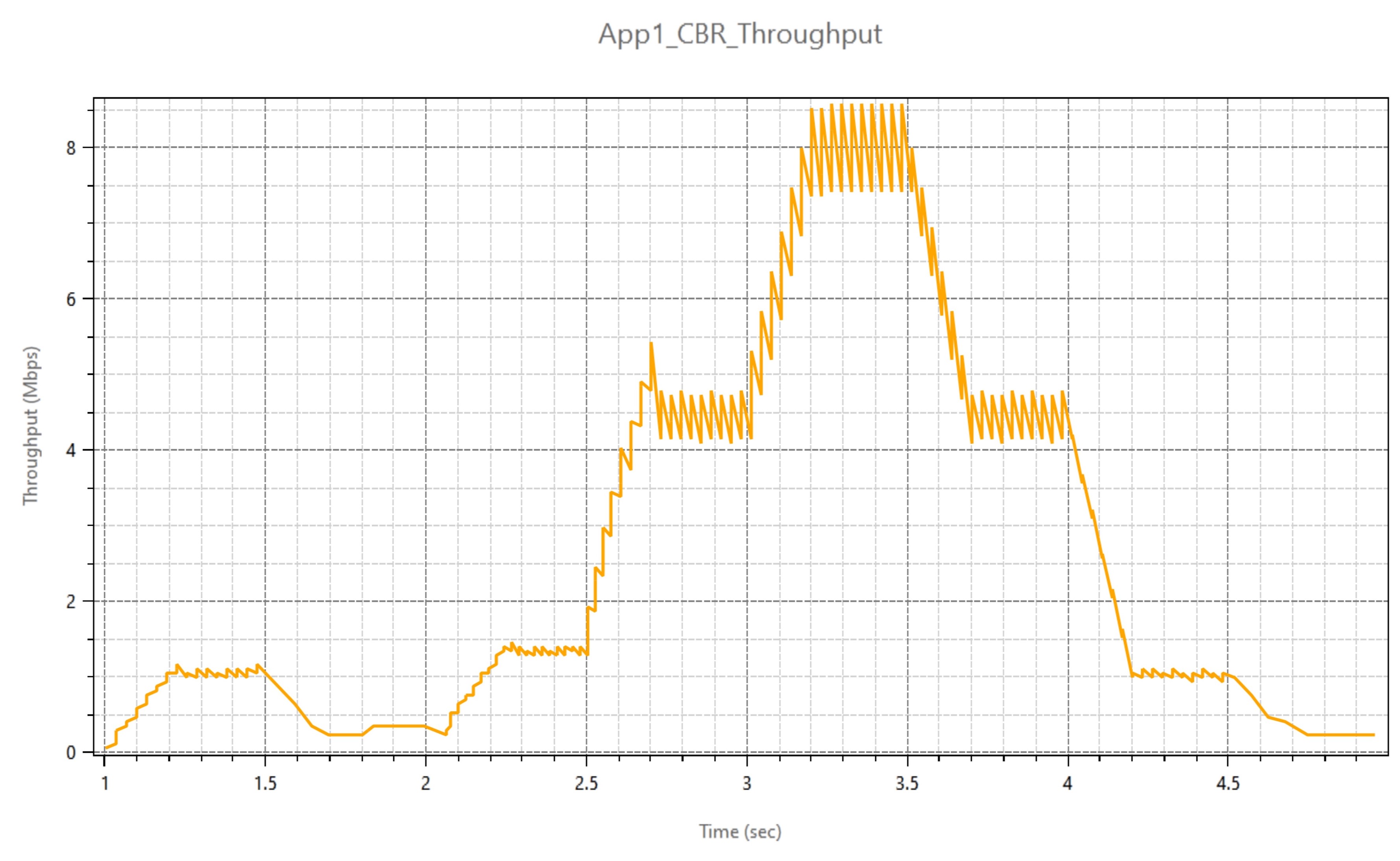
Throughput vs Time Plot for Download Application
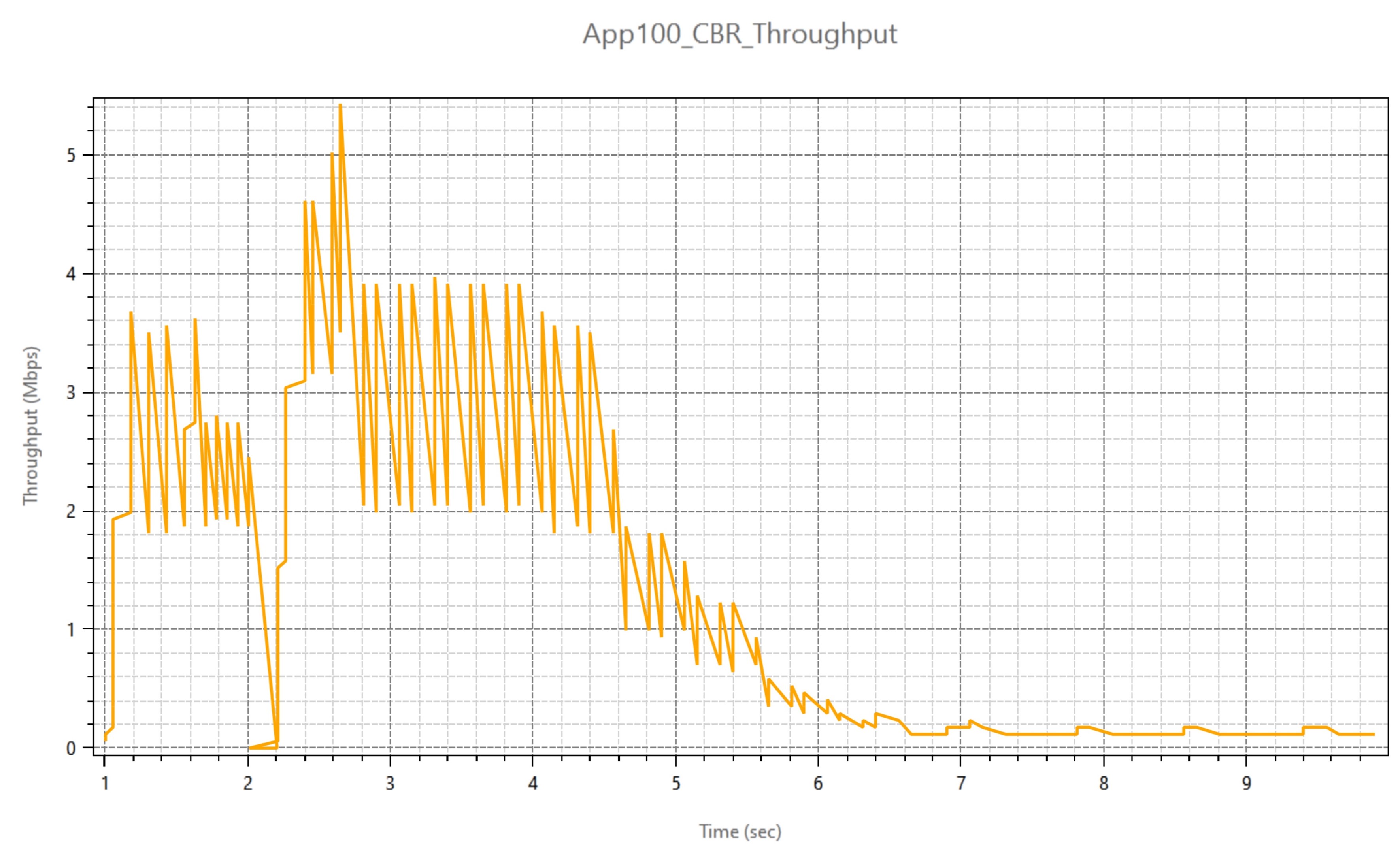
The Handover Procedure can be further understood with the help of the SNR plot. The SNR vs Time plot can be obtained from LTENR_Radio_Measurement log file which can be enabled from logs in GUI. SNR vs Time plot can be done by following the steps:
- Filter the UE Name Column to UE10, channel column to PDSCH because the network has downlink traffic.
- Select the Time (ms) column and SNR (dB) column from the excel sheet and click on the insert option from the toolbar.
- From the Insert option click on charts > scatter with smooth line option to get SNR vs. Time plot.
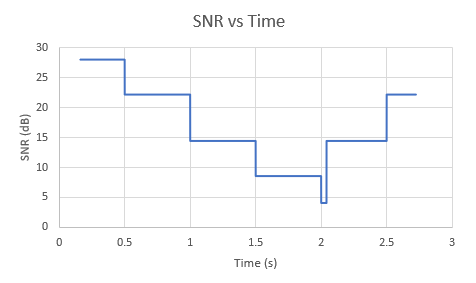
The SNR vs Time plot shown above represents the variation in SNR with respect to time between UE_10 and the connected gNB. As the UE moves away from the Serving gNB, there will be a decrease in the SNR between the serving gNB and the UE. The decrease in SNR results in a decrease in throughput. As the UE moves further away, at around 2.04 seconds, it gets handed over to the target gNB after which there will be an increase in SNR as the UE moves towards the target gNB.
Related articles:
How can I plot SNR measured by UE?
How is the cell selection and UE attach procedure modeled in NetSim 5G ?
How can I get plots for SNR in NetSim?
Where can I find packet trace and event trace csv files after simulation?