
| Applicable Versions | NetSim Standard | NetSim Pro |
| Applicable Releases | v14.4 |
Introduction
The Raspberry Pi is a compact, affordable single-board computer developed by the Raspberry Pi Foundation to promote experimentation and innovation in computing and networking. It primarily runs on Raspberry Pi OS (Raspbian) - a Debian-based Linux distribution and supports Ubuntu, Windows 10 IoT Core, and RISC OS.
Designed to encourage programming education and hardware interfacing, the Raspberry Pi supports languages such as Python and Scratch, making it a powerful platform for IoT, network simulation, and real-world emulation using NetSim.
Raspberry Pi Setup
- Install the Operating System and Boot Up Raspberry Pi
- Use the official Raspberry Pi Imager to install the OS.
- Connect peripherals (monitor, keyboard, mouse) and boot up the device.
- Assign Static IP Address
- Configure a static IP to ensure stable communication between Raspberry Pi and the NetSim Emulator.
- Modify Routing for NetSim Connection
- Update the routing table on Raspberry Pi so that packets are correctly routed toward the NetSim virtual network.
Interfacing Raspberry Pi with NetSim
- Physical Connection
- Connect sensors or hardware components (e.g., LEDs, LCDs, Keypads) to the Raspberry Pi’s GPIO pins.
- Mapping Raspberry Pi to a Virtual Node in NetSim
- Use the NetSim Emulation Application to map the Raspberry Pi to a corresponding virtual node.
- This creates a link between the physical device and the simulated network in NetSim.
- Standalone Testing
- Test sensor and device connections locally on the Raspberry Pi before integrating with NetSim.
- Virtual Network Communication
- Send and receive data between Raspberry Pi’s through the emulated NetSim network and verify connectivity.
- Run IoT Emulation in NetSim
- Execute the NetSim IoT Emulation scenario using the configured parameters to simulate network performance.
- Network Analysis
- Examine network behaviour under various conditions:
- Packet Loss: Due to noise, interference, or collisions.
- Delay and Jitter: Caused by congestion, bandwidth limitations, or retransmissions.
- Examine network behaviour under various conditions:
Example Experiments
- Keypad to Display Communication
Send numeric input from a 4×4 keypad connected to Raspberry Pi 1 to a 7-segment display on Raspberry Pi 2 via the NetSim network.
- Real Sensor Data Transmission
This experiment involves interfacing real-world sensors with a Raspberry Pi to capture and transmit live environmental data through NetSim to another Raspberry Pi node.
The sensors used in this setup include:
- Temperature Sensor (DHT11) – Measures the surrounding temperature and humidity levels.
- Humidity Sensor – Monitors the moisture content of the environment.
- Ultrasonic Distance Sensor – Calculates the distance or proximity of nearby objects.
- Light Intensity Sensor (LDR) – Detects the intensity of ambient light.
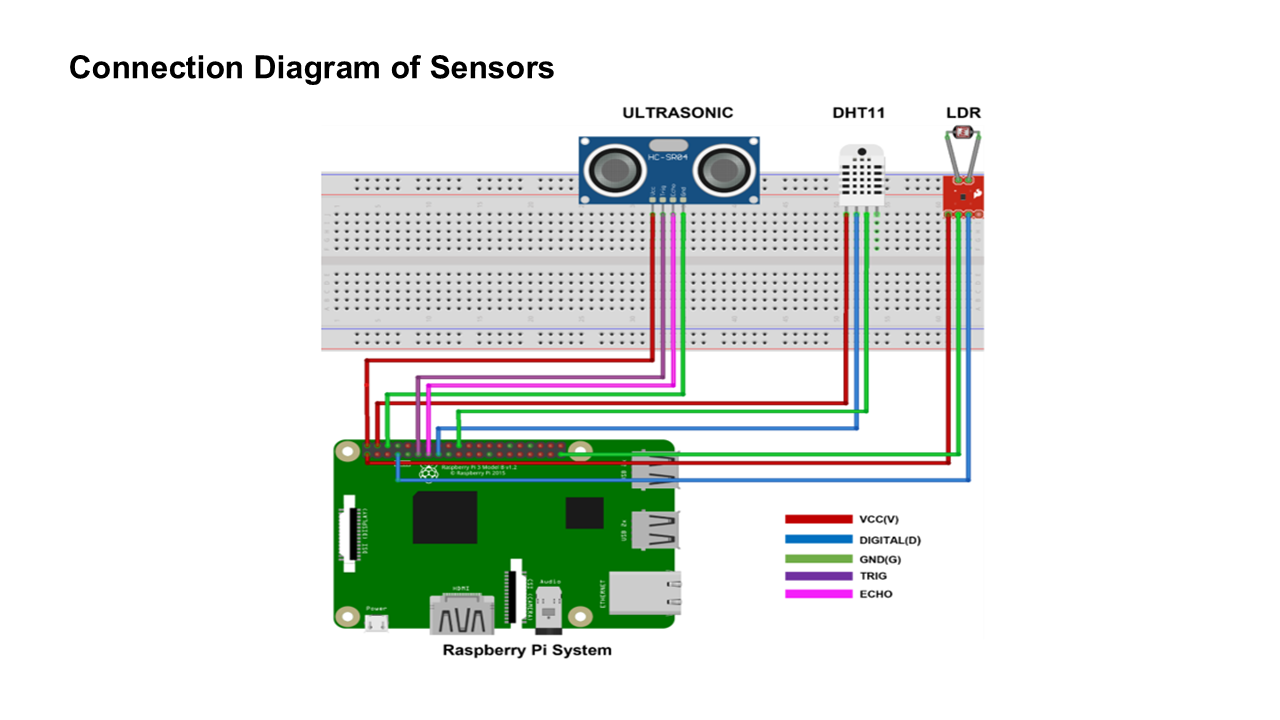
The data collected from these sensors is transmitted over the NetSim IoT network to a destination Raspberry Pi, where it is displayed on an LCD screen. This experiment demonstrates real-time sensor-to-sensor communication through a simulated network, effectively integrating physical sensing devices with virtual networking.
- Ping and Network Performance Testing
Send ICMP ping packets between two Raspberry Pi’s and observe round-trip delay, packet loss, and jitter while altering network parameters in NetSim.
- Remote LED Control Based on Events
Implement a simple intrusion detection scenario where Raspberry Pi 2 detects an event and triggers an LED on Raspberry Pi 1 through the NetSim connection.
- Real-Time Traffic Analysis using Wireshark
Capture and analyse packets exchanged between Raspberry Pi’s in real-time using Wireshark, and study network characteristics such as delay, throughput, and retransmissions.
Resources
For complete setup instructions, interfacing guides, experiment manuals, and example Python codes, visit the official GitHub repository:
https://github.com/NetSim-TETCOS/NetSim-Raspberry-Pi-Project_v14.2.git
Watch the Tutorial Video
Watch our detailed video demonstration showing the complete process — from connecting Raspberry Pi to NetSim, interfacing real sensors, and analysing live IoT communication and a general video about NetSim Emulator.